Using Segments to send daily survey emails within a workflow | XM Community
Skip to main content
Question

Using Segments to send daily survey emails within a workflow

  • June 20, 2024
  • 18 replies
  • 430 views

Forum|alt.badge.img+1

We are in the process of moving all of our automations over to workflows. these automations include survey invite distributions via email. Qualtrics support has told me that workflows do not support segments so wondering how those who currently send survey invite emails via segments are going to do so moving forward as Qualtrics transitions us out of automations into workflows?  

18 replies

jmborzick
QPN Level 5 ●●●●●
Forum|alt.badge.img+41
  • QPN Level 5 ●●●●●
  • June 20, 2024

@kschaefer Regardless of whether you are updating your directory via Automation or Workflows shouldn’t affect your ability to send a survey out via segments. In the workflows you can trigger a survey invite when someone is added to segment. Perhaps I’m misunderstanding your question.


Forum|alt.badge.img+1
  • Author
  • June 20, 2024

@jmborzick Thank you for your reply!

so with this task, the survey would send as soon as the segment were updated? we are currently updating segments daily with a daily extract to the directory - so once the directory is updated, the segment is updated, and the survey will trigger to send to anyone new in that segment?

Would you recommend this for invites and invite reminders as well? 


jmborzick
QPN Level 5 ●●●●●
Forum|alt.badge.img+41
  • QPN Level 5 ●●●●●
  • June 20, 2024

That is correct. Whenever someone is added to the directory you can have a survey automatically sent to the new addition. However, this will not work for reminders; that would need to be set up separately.


You would set a workflow to update the directory contacts with a field when they complete the survey. Once they have that field, you could have them removed from the segment. Within the directory you would then create a series of reminder emails that would send at a pre-programmed time to anyone who has not yet completed the survey. 


Forum|alt.badge.img+1
  • Author
  • June 20, 2024

@jmborzick would that be an experience iD change using interactions and then update XM directory contacts as a task?


jmborzick
QPN Level 5 ●●●●●
Forum|alt.badge.img+41
  • QPN Level 5 ●●●●●
  • June 20, 2024

@kschiedemeyer Correct. 


Forum|alt.badge.img+1
  • Author
  • June 24, 2024

are you also using responseID  as the data field?


It looks like Qualtrics library is not syncing with workflows (apparently this is across the board) so we have to manually copy and paste - issue is colors and layout don't necessarily carry over how are you/ are you working around this issue or waiting for a resolve? 


jmborzick
QPN Level 5 ●●●●●
Forum|alt.badge.img+41
  • QPN Level 5 ●●●●●
  • June 24, 2024

@kschaefer Could you tell me more about “colors and layout?” I’m unclear as to what you’re referring. 


Regarding loading the details from the segment into the email, I skipped a step in my original description. 

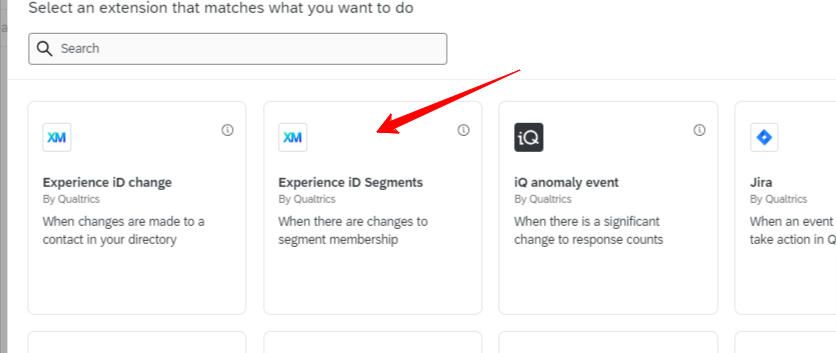
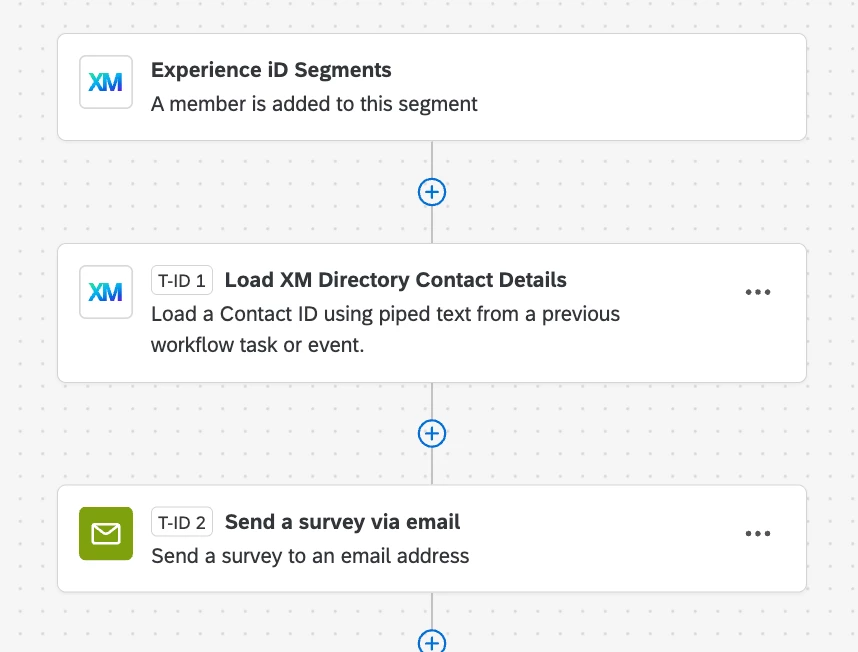
The trigger is “Experience iD Segements” a member is added to the segment

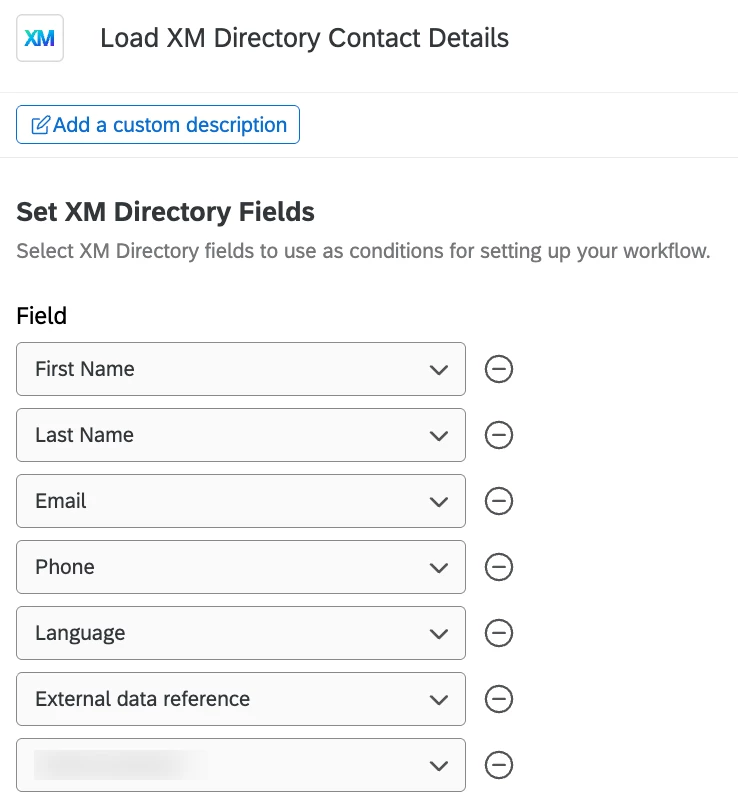
The first task is: “Load XM Directory Contact Details” The contact ID is: ~{qde://objectId}

The second Task is: “XM Directory” Distribution type: Individual & Method: Email


Forum|alt.badge.img+1
  • Author
  • June 24, 2024

ah got it - and that additional task is for invites and reminders?


I have invite and reminder copy built out in libraries - turns out you need to turn the message type to general in order to be able to select them as an option for email distribution


jmborzick
QPN Level 5 ●●●●●
Forum|alt.badge.img+41
  • QPN Level 5 ●●●●●
  • June 24, 2024

The additional task grabs the data from the directory so it’s there to load into the email. 


It’s not going to help with reminder emails though. This  workflow will only work for initial emails. If you want reminders, you’d need to set the workflow above to add an additional piece of embedded data to the directory data. You’d then create another segment and build it to bring in people who don’t have that embedded data field and have been in your directory more than x number of days. You could then build reminder emails off the new segment. 


Forum|alt.badge.img+1
  • December 5, 2025

Hey did you get this up-and-running? I’m trying to set up a workflow to send a survey only to newly added members of the segment, but it keeps sending to ALL members of the segment whenever someone new is added. The workflow I’ve set up is triggered by an Experience iD Segment (a member is added to this segment), I added a Decision where DomainEvent data equals Added, and then the task is to send a survey via email. I’d appreciate any insights you could offer!


jmborzick
QPN Level 5 ●●●●●
Forum|alt.badge.img+41
  • QPN Level 5 ●●●●●
  • December 5, 2025

@idlamegan  I don’t know how you’ve attempted this already, but here is how I would build it. 


Trigger-”Experience iD Segments” (A member is added to the segment

Task 1- “Load XM Directory Contact Details” 

Task 2-”XM Directory” -  “Distribution Type=Individual”


Forum|alt.badge.img+1
  • December 9, 2025

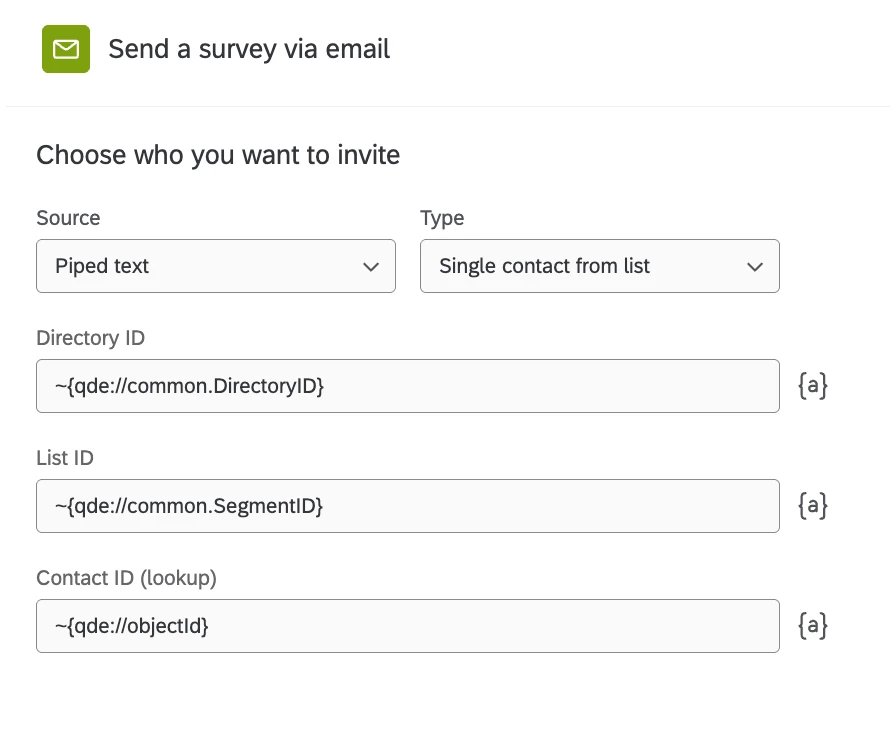
Thanks for the advice! I’m not sure what is causing my issue. I think I’ve set the workflow up correctly, but it is failing at the task to send a survey via email. This is how I’ve set up that task:

And according to the workflow run history, the fields it is pulling in are correct (e.g. it’s pulling the corresponding DirectoryID, SegmentID, and the new ContactID).


I’d really appreciate any insights anyone could offer!


jmborzick
QPN Level 5 ●●●●●
Forum|alt.badge.img+41
  • QPN Level 5 ●●●●●
  • December 9, 2025

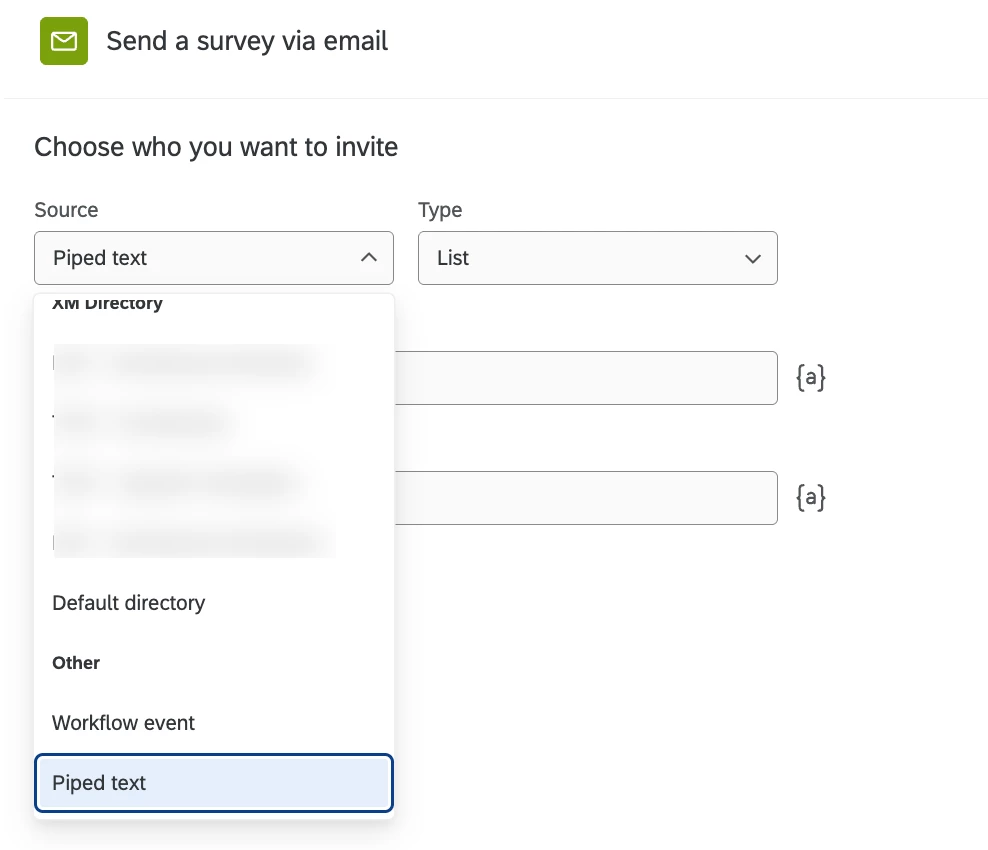
@idlamegan It looks like the problem is your source. Instead of piped text, choose T1, the task where you load directory contacts. 


Forum|alt.badge.img+1
  • December 9, 2025

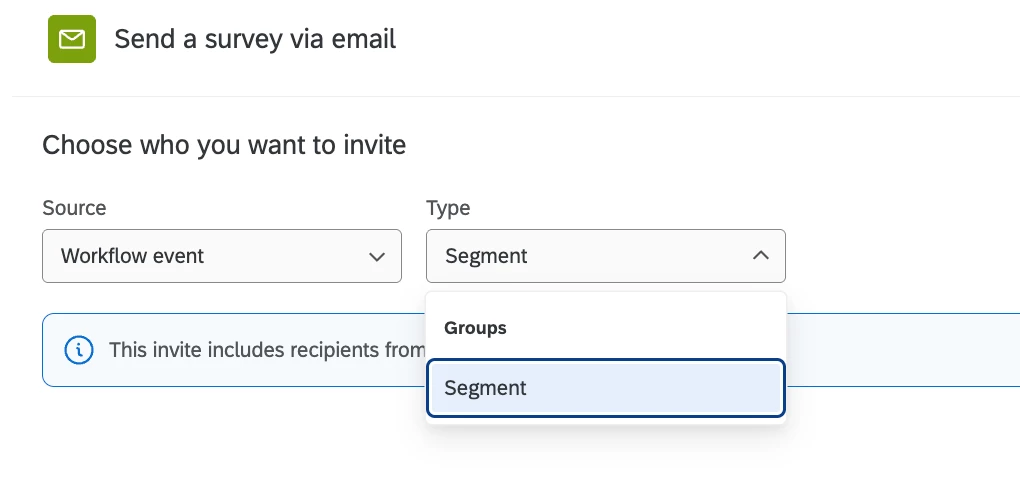
Sorry to keep asking for additional clarification--I really appreciate the help! Here are the options I’m getting in the task:

By T1, do you mean “Workflow Event”? I believe Qualtrics has been renaming a few things. And from there I select the only option?

Thanks again!


jmborzick
QPN Level 5 ●●●●●
Forum|alt.badge.img+41
  • QPN Level 5 ●●●●●
  • December 9, 2025

@idlamegan  Prior to adding the email task, did you add the “Load XM Directory Contact Details” task?


Forum|alt.badge.img+1
  • December 9, 2025

@jmborzick Yup! I’ll include all the relevant screenshots in case I’m missing something obvious.

Thanks again!


jmborzick
QPN Level 5 ●●●●●
Forum|alt.badge.img+41
  • QPN Level 5 ●●●●●
  • December 9, 2025

@idlamegan Instead of using the Send Survey via Email task, try using this one:


Forum|alt.badge.img+1
  • December 9, 2025

@jmborzick  Ok, I’ll try that out and see if I can get it working. Thanks so much!