



We ask a household size question first, and then we ask them to indicate the age ranges for each member of the hh using a side-by-side matrix with the age column as a drop down. The first row is the respondent, and I want to populate the drop-down with what was selected in the previous age question (18-24,25-34,35-54,55+) and then make it read-only.
I was able to do this before when the column is a text entry but not sure how to implement the code with a drop-down.
Is this possible?

Solved
Populate first row of a side by side matrix based on a previous question and make it read-only
Best answer by srbaumruk
Hi rarcega , try the following code
Qualtrics.SurveyEngine.addOnload(function()
{
const prefilledAnswer = "${e://field/EMBEDDED_DATA_FIELD_NAME}" // the embedded data field must EXACTLY match the text of the option choice. Only replace the text EMBEDDED_DATA_FIELD_NAME with the embedded data field of your choice, or use the answer to a multiple choice question by replacing everything inside the quotation marks with ${q://QID1/ChoiceGroup/SelectedChoices}, replacing QID1 with the correct QID.
const container = this.getQuestionContainer()
const firstSelectBox = container.querySelector('select')
const options = firstSelectBox.querySelectorAll('option')
const desiredOptionList = [...options].map((option) => option).filter((option) => option.innerText.trim() == prefilledAnswer.trim())
if (desiredOptionList.length == 0) {
alert('No option found for ' + prefilledAnswer + '. Make sure that option is included in your scale.')
}
else {
// set value of select box
console.log(desiredOptionList)
const desiredOption = desiredOptionList[0]
const desiredOptionValue = desiredOption.value
firstSelectBox.value = desiredOptionValue
// make select box read only
firstSelectBox.disabled = true
firstSelectBox.ariaReadOnly = true // for accessibility
firstSelectBox.ariaDisabled = true // for accessibility
}
});
This should give something like the example below, which is what I gathered you were looking for.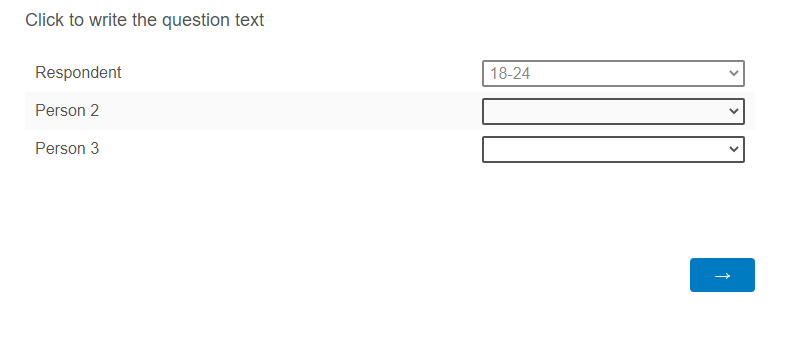 Where the first row is read-only/disabled and pre-filled based on a question response or an embedded data field. Another idea I'd consider is not including the respondent at all in the matrix.
I used a likert matrix which may differ slightly depending how your question is configured. Attached is the QSF.
AnsweringForumQuestions.qsf

Sign up
Already have an account? Login

Welcome! To join the Qualtrics Experience Community, log in with your existing Qualtrics credentials below.
Confirm your username, share a bit about yourself, then you're ready to explore and connect .
Free trial account? No problem. Log in with your trial credentials to join.
No free trial account? No problem! Register here
Already a member? Hi and welcome back! We're glad you're here 🙂
You will see the Qualtrics login page briefly before being taken to the Experience Community.
Login with Qualtrics
Welcome! To join the Qualtrics Experience Community, log in with your existing Qualtrics credentials below.
Confirm your username, share a bit about yourself, then you're ready to explore and connect .
Free trial account? No problem. Log in with your trial credentials to join. No free trial account? No problem! Register here
Already a member? Hi and welcome back! We're glad you're here 🙂
You will see the Qualtrics login page briefly before being taken to the Experience Community.
Login to the Community
No account yet? Create an account
Welcome! To join the Qualtrics Experience Community, log in with your existing Qualtrics credentials below.
Confirm your username, share a bit about yourself, then you're ready to explore and connect .
Free trial account? No problem. Log in with your trial credentials to join.
No free trial account? No problem! Register here
Already a member? Hi and welcome back! We're glad you're here 🙂
You will see the Qualtrics login page briefly before being taken to the Experience Community.
Login with Qualtrics
Welcome! To join the Qualtrics Experience Community, log in with your existing Qualtrics credentials below.
Confirm your username, share a bit about yourself, then you're ready to explore and connect .
Free trial account? No problem. Log in with your trial credentials to join. No free trial account? No problem! Register here
Already a member? Hi and welcome back! We're glad you're here 🙂
You will see the Qualtrics login page briefly before being taken to the Experience Community.
Enter your E-mail address. We'll send you an e-mail with instructions to reset your password.