



Context: For a study, I have (together with ChatGPT) written an html and JavaScript code to display a panorama picture and allow users to click on the picture on places where they would take a swab. The code stores the coordinates of those swabs, as well as the order of the swabs, so I can later turn it into a heatmap for analysis. The code therefore stores two variables: the final stage with all swabs and an event log. I display this webpage using an iframe in a survey.
Problem: The data is correctly stored in the JS variable and visible in the developer console of the webbrowser when previewing the survey. I want the data to be transferred to a Qualtrics Embedded Data variable upon going to the next page. However, I cannot manage to store that data in a Qualtrics Embedded Data variable. I currently have the following code for the specific question with the panorama iframe:
Qualtrics.SurveyEngine.addOnload(function() {

  let swabData = null;
  let alreadySubmitting = false;

  window.addEventListener("message", function(event) {
    console.log("RECEIVED:", event.data);

    if (event.data && event.data.eventLog) {
      swabData = event.data;
    }
  });

  const nextButton = document.getElementById("NextButton");

  nextButton.addEventListener("click", function(e) {

    if (alreadySubmitting) return;

    e.preventDefault();

    const iframe = document.getElementById("swabFrame");
    iframe.contentWindow.postMessage("requestData", "*");

    const waitForData = setInterval(() => {

      if (swabData) {
        clearInterval(waitForData);

		console.log("Storing data:", swabData);

		Qualtrics.SurveyEngine.setEmbeddedData("eventLog", JSON.stringify(swabData.eventLog));
		Qualtrics.SurveyEngine.setEmbeddedData("finalSwabs", JSON.stringify(swabData.finalSwabs));
		Qualtrics.SurveyEngine.setEmbeddedData("test", "It does not save from here");

        alreadySubmitting = true;
        Qualtrics.SurveyEngine.navClick(event, 'NextButton');
      }

    }, 100);

    setTimeout(() => {
      if (!swabData) {
        console.warn("Timeout, continuing anyway");
        alreadySubmitting = true;
        nextButton.click();
      }
    }, 1000);

  });

});
All console.log()s print the correct data in the developer console. The setEmbeddedData on the test value does not save anything either. My Survey Flow looks as follows:
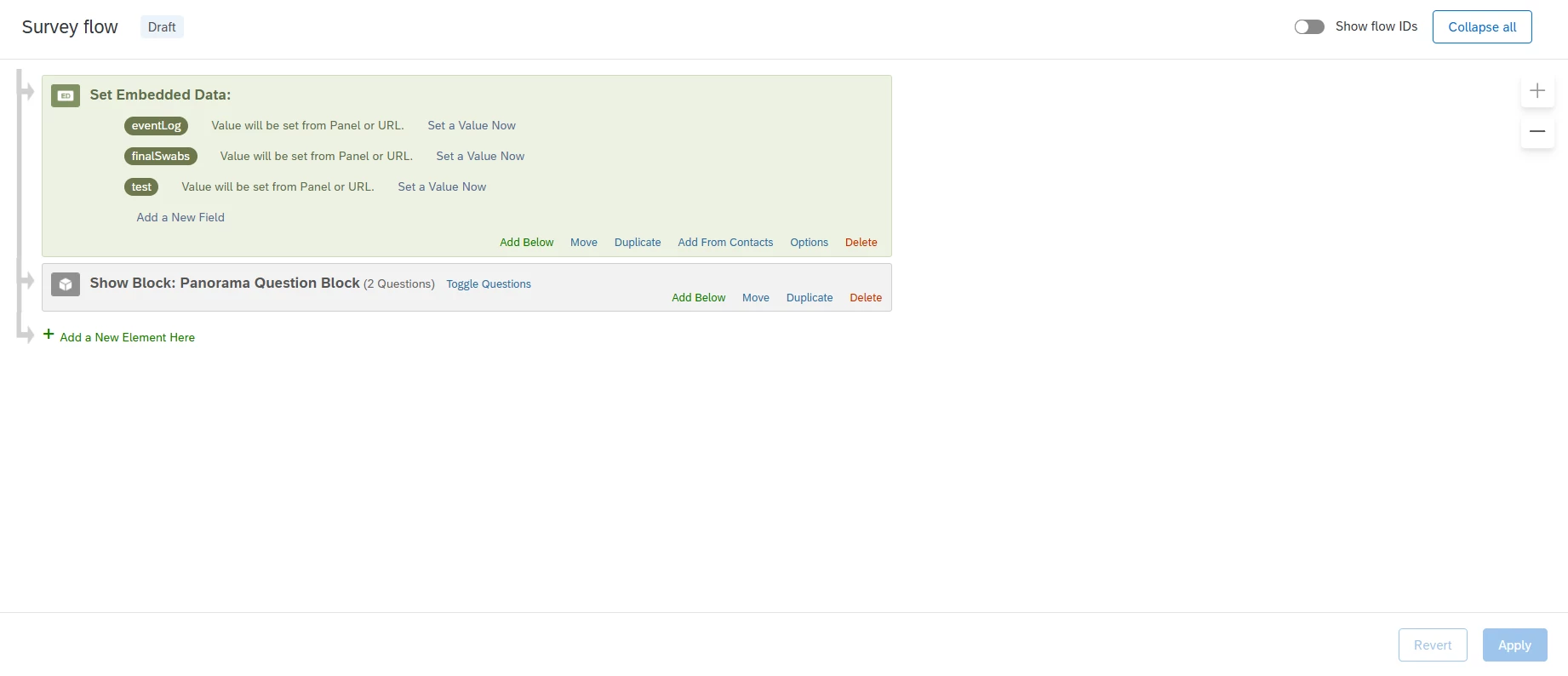
The console in the developer tools shows the following:
SENDING DATA: {eventLog: Array(4), finalSwabs: Array(4)}
RECEIVED: {eventLog: Array(4), finalSwabs: Array(4)}
Storing data: {eventLog: Array(4), finalSwabs: Array(4)}
Just got a page template transaction id 5 but we are on 5. Ignoring new template.
Just got a page template transaction id 5 but we are on 5. Ignoring new template.
What am I doing wrong here?



