Sending personal links to Twilio using Webservice Task for WhatsApp Distribution Automation | Experience Community
Skip to main content
Question

Sending personal links to Twilio using Webservice Task for WhatsApp Distribution Automation

  • February 12, 2026
  • 8 replies
  • 6 views

Forum|alt.badge.img+1

Hi, As Qualtrics lacks WhatsApp distribution automation currently, I want to build a workflow where this task can be automated, So using the Webservice task I can post the Key and the dynamic values to Twilio and then it triggers a WhatsApp message, however the webservice task do not generate a personalized link like any other distribution task like SMS or send email task does .
I would like to get some answers for this, how we can generate the personal links for each contact that is being triggered from the source system and using the piped text we can send the generated personal link to Twilio?

8 replies

arunxmarchitect
Level 3 ●●●
Forum|alt.badge.img+5

@smithin21 , You’ve got a couple of options here.

Option 1: Native WhatsApp distribution : Qualtrics supports direct WhatsApp distribution. You can find the full setup details here: https://www.qualtrics.com/support/iq-directory/distributions-tab-iq-directory/whatsapp/whatsapp-distributions/


Option 2: Web service–based integration​​​​​​​: If you prefer a custom integration, you can use the Qualtrics Distribution API to generate personal survey links and then pass those links via a web service task (e.g., into WhatsApp or another channel).
API reference here: https://api.qualtrics.com/573e3f0a94888-create-distribution#generate-distribution-links


Forum|alt.badge.img+15
  • QPN Level 5 ●●●●●
  • February 13, 2026

@smithin21, This would require a workflow that does the following:

  1. Accept data(either endpoint/ Salesforce….etc)
  2. XM Directory workflow that adds the contact along with transaction data to the directory
  3. Code task that captures the transaction ID(CTR…..) for further use.
  4. Adding this transaction to batch(this generates a batchID(BT….)
    (https://api.qualtrics.com/ca5ad8bbec6fb-create-transaction-batch#Path-Parameters)
  5. Generating the distribution for this batch(Personal Link)
    (https://api.qualtrics.com/573e3f0a94888-create-distribution#generate-distribution-links)
    Instead of “mailingList” it should be “transaction BatchId” in payload(BT…...)
  6. Retrieving the personal link
          (https://api.qualtrics.com/573e3f0a94888-create-distribution#retrieve-generated-links)
  7. Using the personal link and the phone number to send to Twilio endpoint.


Hope this helps


Forum|alt.badge.img+15
  • QPN Level 5 ●●●●●
  • February 16, 2026

@smithin21,

The batch creation would be required if you want to add any sampling criteria, else, just transaction creation should work fine.


Forum|alt.badge.img+1
  • Author
  • February 16, 2026

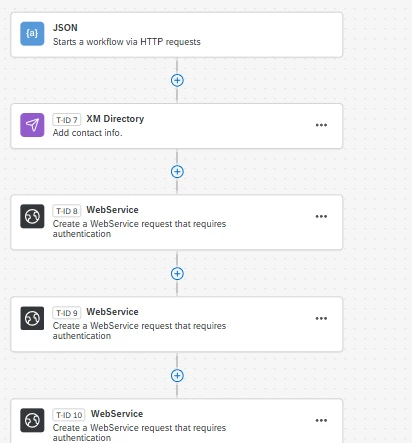
Hi ​@arunxmarchitect & ​@Sowrabh1993, Thanks much for the info, I was able to generate the link, as in added a Total of three Webservice Task’s and the XM Director task to add contact to the mailing list, here is the flow

1️⃣ XM Directory → Add Contact

2️⃣ WebService Task → Create Distribution

3️⃣ WebService Task → Retrieve Link

4️⃣ WebService Task → Send the link and the MetaData to Twilio.

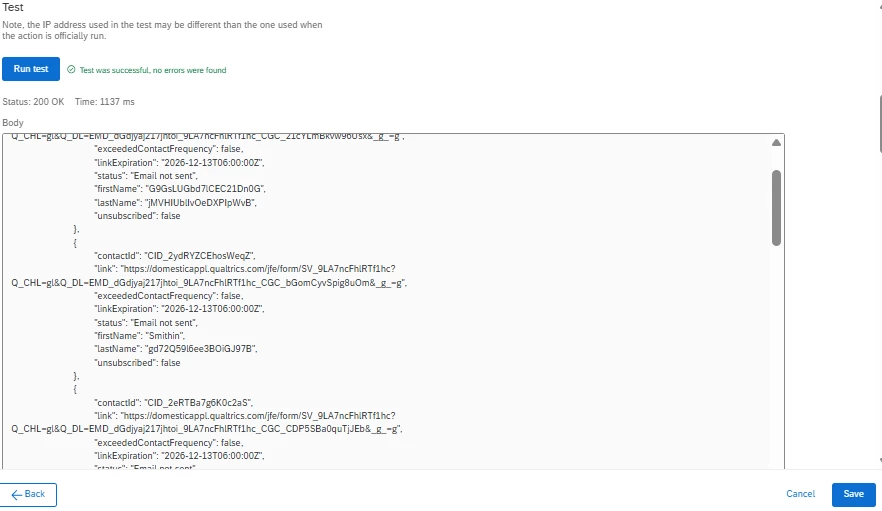
 Now I have run into another issue. In Task 3, I pasted the JSON body exactly as described in Qualtrics API, only replacing the values. However, instead of retrieving the link for the most recent trigger, Task 3 is returning all the data from the contact list, including the previously generated links from the directory contact list.
How can we fix this ?


Forum|alt.badge.img+15
  • QPN Level 5 ●●●●●
  • February 16, 2026

@smithin21,

Could you please share the API endpoint that you are using?
Also, I can’t see any JSON body in the above message. (Could you re-paste it please?)(not sure if any issue at my end which did not render it)


Forum|alt.badge.img+1
  • Author
  • February 17, 2026

Sure ​@Sowrabh1993 
Here is the exact end points and payload

Task 2: WebService Task → Create Distribution
Post: https://fra1.qualtrics.com/API/v3/distributions
 

Headers

Key                              Value
Content-Type     application/json
x-api-token          XXXXXX

Body:
{"surveyId":"SV_9LA7ncFhlRTf1hc","linkType":"Individual","description":"distribution 2026-01-24 00:00:00","action":"CreateDistribution","expirationDate":"2026-12-13T06:00:00Z","mailingListId":"CG_zVxu41hp1djdlOV","directoryId":"POOL_1DJdZLOVIiqGWZT"}

Task 3:  WebService Task → Retrieve Link
GET: https://fra1.qualtrics.com/API/v3/distributions/EMD_dGdjyaj217jhtoi/links?surveyId=SV_9LA7ncFhlRTf1hc

Headers

Key                              Value
x-api-token                XXXXXX
 

And Task 4

WebService Task → Send the link and the MetaData to Twilio.

This is the exact configuration 


Forum|alt.badge.img+15
  • QPN Level 5 ●●●●●
  • February 17, 2026

@smithin21, I see that you are passing the entire Mailing list ID while distributing and hence the retrieve API grabs all the contacts.

It would be nice to know a little background of how the contact is received into Qualtrics(bulk/individual)?
How are you adding the contact to XM Directory? transaction based? If this is transaction based using “XM Directory” task, then you need to add the transaction to a batch and then select the batch ID
https://api.qualtrics.com/573e3f0a94888-create-distribution#generate-links-for-transaction-batch

This will be in scenario if the events happen for 1 contact at a time.


Forum|alt.badge.img+1
  • Author
  • February 17, 2026

@Sowrabh1993  Hi,

We receive the JSON event from C4C via CPI at our endpoint for each tickets raised in C4C. Once the event is received, the fields are mapped in the XM Directory task. The current flow is as follows:

  1. XM Task – Add the contact to the list
  2. WebService Task – Create the distribution
  3. WebService Task – Retrieve the link
  4. WebService Task – Send the data to Twilio

So only one link should be generated for each trigger and that needs to retrieved and sent to Twilio for WhatsApp trigger. Right now Task 3 is returning all the Generated links and sending it to the Twilio Task(4). How do we solve this, can you please tell me how to modify the flow and add or delete… 
Below is the screenshot of  how the Task (3) test is retrieving and also the screenshot of the flow