Historical Survey response Update | Experience Community
Skip to main content
Question

Historical Survey response Update

  • April 29, 2026
  • 10 replies
  • 27 views

Forum|alt.badge.img+1

I have a question regarding an update needed in one of the embedded data fields in our NPS survey.

Currently, the embedded data follows a standard format (e.g., “ABC”), but due to a recent change, some responses are now being recorded as “#ABC”. As a result, in the CX Dashboard reporting, these values are being treated as two separate entries (“ABC” and “#ABC”**), which is impacting consistency.

I’d like to understand how we can perform a historical update to standardize this—either by:

  • Updating “#ABC” responses to “ABC”,

I am aware that this might be possible via Postman/API, but I wanted to check:

  • Has anyone handled a similar case before?
  • Is there a recommended or more efficient approach within Qualtrics to address this?

Any guidance or support would be greatly appreciated.

10 replies

AlexandreLeduc
QPN Level 4 ●●●●
Forum|alt.badge.img+25
  • QPN Level 4 ●●●●
  • April 29, 2026

If the goal si to have it shown properly only in the dashboard, you could also simply recode your old value to the new one or vice versa. Example #ABC could be recoded as ABC so it would appear as the same. 


Forum|alt.badge.img+1
  • Author
  • April 29, 2026

If the goal si to have it shown properly only in the dashboard, you could also simply recode your old value to the new one or vice versa. Example #ABC could be recoded as ABC so it would appear as the same. 


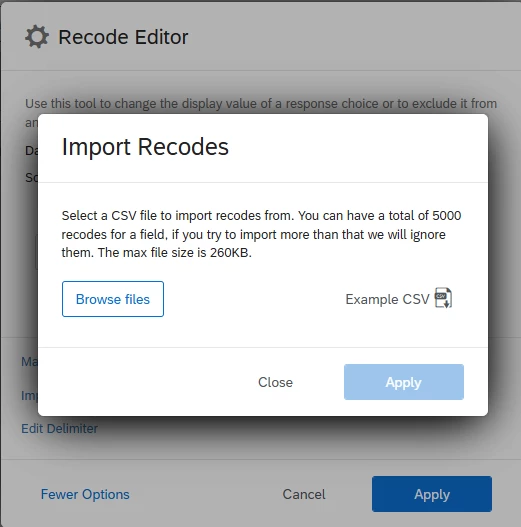
Do you mean recoding in the Dashboard Data? I’m not sure that would work well—are you referring to this section?


AlexandreLeduc
QPN Level 4 ●●●●
Forum|alt.badge.img+25
  • QPN Level 4 ●●●●
  • April 29, 2026

yes. You can do it manually if you do not have a lot of possibilities or you can import recodes as your screenshot suggests.


AlexandreLeduc
QPN Level 4 ●●●●
Forum|alt.badge.img+25
  • QPN Level 4 ●●●●
  • April 29, 2026

Otherwise, you also have this API call that can be use to batch update your embedded data : https://api.qualtrics.com/2ced5de7dc638-start-an-update-embedded-data-job


Forum|alt.badge.img+1
  • Author
  • April 29, 2026

yes. You can do it manually if you do not have a lot of possibilities or you can import recodes as your screenshot suggests.

For example, in the current situation we have multiple values such as “#ABC” to “ABC”, as well as “#DEF” to “DEF” etc etc

My concern is that while we could potentially recode these values in the dashboard, this would only impact the visualisation layer and not the underlying data used for access restrictions.

At the moment, access is already configured based on values like “ABC” for certain users. However, additional users now require access to both “ABC” and “#ABC”, since they represent the same thing

Because of this, I don’t believe dashboard-level recoding would be sufficient, as it wouldn’t resolve the access control issue.

This is why I was considering an API-based (e.g., Postman) update to standardise the values at the data level (e.g., converting “#ABC” to “ABC”), so that both reporting and access restrictions remain consistent.

Could you please confirm if this is the right approach, or if there is a better way to handle this?


Forum|alt.badge.img+1
  • Author
  • April 29, 2026

Otherwise, you also have this API call that can be use to batch update your embedded data : https://api.qualtrics.com/2ced5de7dc638-start-an-update-embedded-data-job

Thanks for sharing this.

I’ve gone through the API documentation, but I’m not entirely clear on how to implement the batch update for embedded data in this case.

Would you be able to guide me through this step‑by‑step, or point me to an example of how it can be used for updating values. That would be really helpful.


AlexandreLeduc
QPN Level 4 ●●●●
Forum|alt.badge.img+25
  • QPN Level 4 ●●●●
  • April 29, 2026

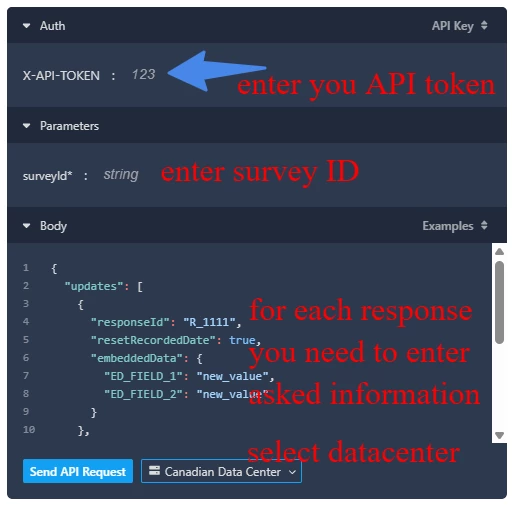
here you go 


Forum|alt.badge.img+1
  • Author
  • April 29, 2026

here you go 


Okay this is great Thank you so much but what if I have like 2000 survey responses? Is there any way to do that all together?


AlexandreLeduc
QPN Level 4 ●●●●
Forum|alt.badge.img+25
  • QPN Level 4 ●●●●
  • April 29, 2026

not that i know of.


Forum|alt.badge.img+1

genera un excel con los datos que deseas actualizar. 

la primera columna debe tener el IDResponse en una columna colocas el valor viejo y en otra al valor nuevo . guardas el archivo excel a json. y ese sera tu endpoint para que la API tome los datos desde ahi para actualizar los 2000 respuestas.