Dashboard Help for Scoring Embedded Data | XM Community
Skip to main content
Question

Dashboard Help for Scoring Embedded Data

  • May 18, 2023
  • 8 replies
  • 208 views

Forum|alt.badge.img+3

Hi all,

I have added a scoring category to my dashboard as embedded data and the data field can be selected within widgets but no data is being populated.  The scoring categories were created after the dashboard was created.

There is data present within the survey data tab so I know that there should be figures available.

Can someone advise if I have missed a step after adding the scoring embedded data to dashboard data area.  The embedded data for scoring is added as numeric value. the scoring categories are not in the survey flow as embedded data but I didn't think this mattered.

Many thanks

Chris

8 replies

Deepak
QPN Level 8 ●●●●●●●●
Forum|alt.badge.img+46
  • May 18, 2023

Hello @ChrisF , 

As mentioned here“If you forgot to add in a scoring category before sending out your survey, don’t worry! Scoring is retroactive for surveys and will be applied to all previously collected responses, as well as future responses. However, scoring is not retroactive for dashboards.”

If you have data present in survey data try remapping the dashboard after creating a derived data (in data and analysis field editor) which is equal to the scoring data and map that as needed.

Hope it helps!


Forum|alt.badge.img+3
  • Author
  • Level 2 ●●
  • May 18, 2023

Hi Deepak,

Thank you for responding to my query.

That’s unfortunate to hear that scoring is not retroactive for dashboards.  We have released the dashboards to users and realised that users who selected “n/a” are being counted in averages.

When you say to try remapping the dashboard, do you mean I should remove all fields and add back in again or is there key fields that when remapped might refresh the data overall somehow?

Thanks

Chris


Deepak
QPN Level 8 ●●●●●●●●
Forum|alt.badge.img+46
  • May 18, 2023

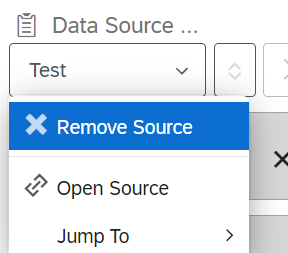
Yeah, I meant removing source and adding again!


Forum|alt.badge.img+3
  • Author
  • Level 2 ●●
  • May 18, 2023

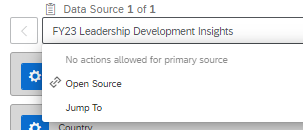
Ah right, unfortunately there does no appear to be an option to remove the source unless I am missing it.


Deepak
QPN Level 8 ●●●●●●●●
Forum|alt.badge.img+46
  • May 18, 2023

When you click on your survey name at top. You can remove it entirely.


Forum|alt.badge.img+3
  • Author
  • Level 2 ●●
  • May 18, 2023

This is my primary source so do not have this option present


Deepak
QPN Level 8 ●●●●●●●●
Forum|alt.badge.img+46
  • May 18, 2023

You might need to create dashboard again post you create the derived data for your scores to display.


Forum|alt.badge.img+3
  • Author
  • Level 2 ●●
  • May 18, 2023

Yes, a new dashboard does seem like the way I need to go unfortunately.  Thanks for taking the time to reply.

Chris