Date in report footer? | XM Community
Skip to main content
Solved

Date in report footer?

  • September 26, 2023
  • 4 replies
  • 63 views

Forum|alt.badge.img

Good afternoon,


I’m creating an advanced report for one of our academic departments, that they can access as needed via the public report. In looking at the header/footer sections I see timezone as option. What I’d like to do is add the current date and time that the report is being viewed. I’ve reviewed all the articles for advanced reporting and didn’t see how to do this. Is there something I could type in the text section that could do this?


Thanks,

Claire
Best answer by sarandos

Hi Claire,

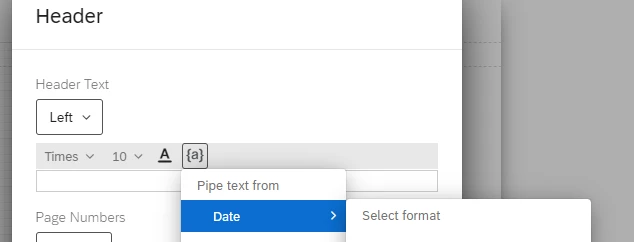
I don’t know if there is a way to timestamp it without using code but you should be able to add the date in the Header options (see below).  You can also add a text box anywhere in the report and used piped text to pull in the date.  I hope that helps!


Thanks, Stephanie


4 replies

Forum|alt.badge.img+9
  • Level 2 ●●
  • Answer
  • September 26, 2023

Hi Claire,

I don’t know if there is a way to timestamp it without using code but you should be able to add the date in the Header options (see below).  You can also add a text box anywhere in the report and used piped text to pull in the date.  I hope that helps!


Thanks, Stephanie


Forum|alt.badge.img
  • Author
  • September 26, 2023

Stephanie,


Of all the other times I’ve used piped text, I should have thought of that. Thank you!


Claire


brookel
Groups Administrator
Forum|alt.badge.img+10
  • Groups Administrator
  • September 26, 2023

Great question @ClaireG! And thanks @sarandos for your quick help!


ashleigh_quaill
Level 3 ●●●
Forum|alt.badge.img+19
  • Level 3 ●●●
  • September 27, 2023

This is a problem we face with dashboards actually! Unfortunately there’s no similar option in the CX dashboards. We’ve requested it before so if you’re interested, it would be great if you can upvote it in the product ideas page too - if you search EV-1401 you’ll find it :)