



Hiding the "powered by Qualtrics" button also on the "end survey" page | Experience Community
Skip to main content
Solved

Hiding the "powered by Qualtrics" button also on the "end survey" page

  • Apr 25, 2025 6:14 PM UTC
  • 13 replies
  • 404 views

Forum|alt.badge.img+2

Thanks to some help here in the community I was able to hide the “powered by Qualtrics” button that usually appears on each survey page at the lower right corner.


I’m using the following JS code on the first question in each of my survey blocks:


Qualtrics.SurveyEngine.addOnReady(function()
{
/*Place your JavaScript here to run when the page is fully displayed*/
jQuery('#Plug').attr('style', 'display:none !important');

});

This works just fine. However, it unfortunately doesn’t work on the very last survey page, i.e. where the “end of survey” message appears because on that particular page there is no option to add JS code. Is there any other way I could hide that button?


Best answer by vgayraud

My bad, I assumed you were using the new survey experience since there was no layout option in your look & feel screenshot above.

If you’re in vanilla classic layout, use Plug instead of plug

<div style="text-align: center;"><span style="font-size:12px;">This is my custom footer text <a href="https://testwhatever.com/sjhvdsavd" target="_blank">here</a>.</span></div>

<script>Qualtrics.SurveyEngine.addOnReady(function() {
var plugElement = document.getElementById('Plug');
if (plugElement) {
plugElement.style.setProperty('display', 'none', 'important');
}

or ​@Shashi ‘s CSS as this :

#Plug {visibility:hidden!important;}


View original

13 replies

Sachin Nandikol
QPN Level 7 ●●●●●●●
Forum|alt.badge.img+54
  • QPN Level 7 ●●●●●●●
  • Apr 26, 2025 3:43 AM UTC

Hello ​@MartinD,

You can use basic CSS to change the font color of the 'Powered by Qualtrics' text to match your survey's background or theme. While it's not a perfect solution, it's a simple workaround, the text will still be present, but it won't be visible to users since it blends in with the background.


Forum|alt.badge.img+2
  • Author
  • Level 2 ●●
  • Apr 28, 2025 7:07 AM UTC

Hi Sachin,


thanks for your reply. I’m afraid I don’t know anything about CSS. I’m probably able to define the color but do you have any hints on how the code woul look like in general?


Shashi
Level 8 ●●●●●●●●
Forum|alt.badge.img+34
  • Level 8 ●●●●●●●●
  • Apr 28, 2025 7:20 AM UTC

Use this code in header or footer HTML view.


Forum|alt.badge.img+2
  • Author
  • Level 2 ●●
  • Apr 28, 2025 7:26 AM UTC

Hi Shashi,


thanks. But that’s exactly teh code I have already in place, no? And this works on all pages except the “end of yurvey page” because I can’t add any JS on this exit page.


Shashi
Level 8 ●●●●●●●●
Forum|alt.badge.img+34
  • Level 8 ●●●●●●●●
  • Apr 28, 2025 7:33 AM UTC

Hi Shashi,


thanks. But that’s exactly teh code I have already in place, no? And this works on all pages except the “end of yurvey page” because I can’t add any JS on this exit page.

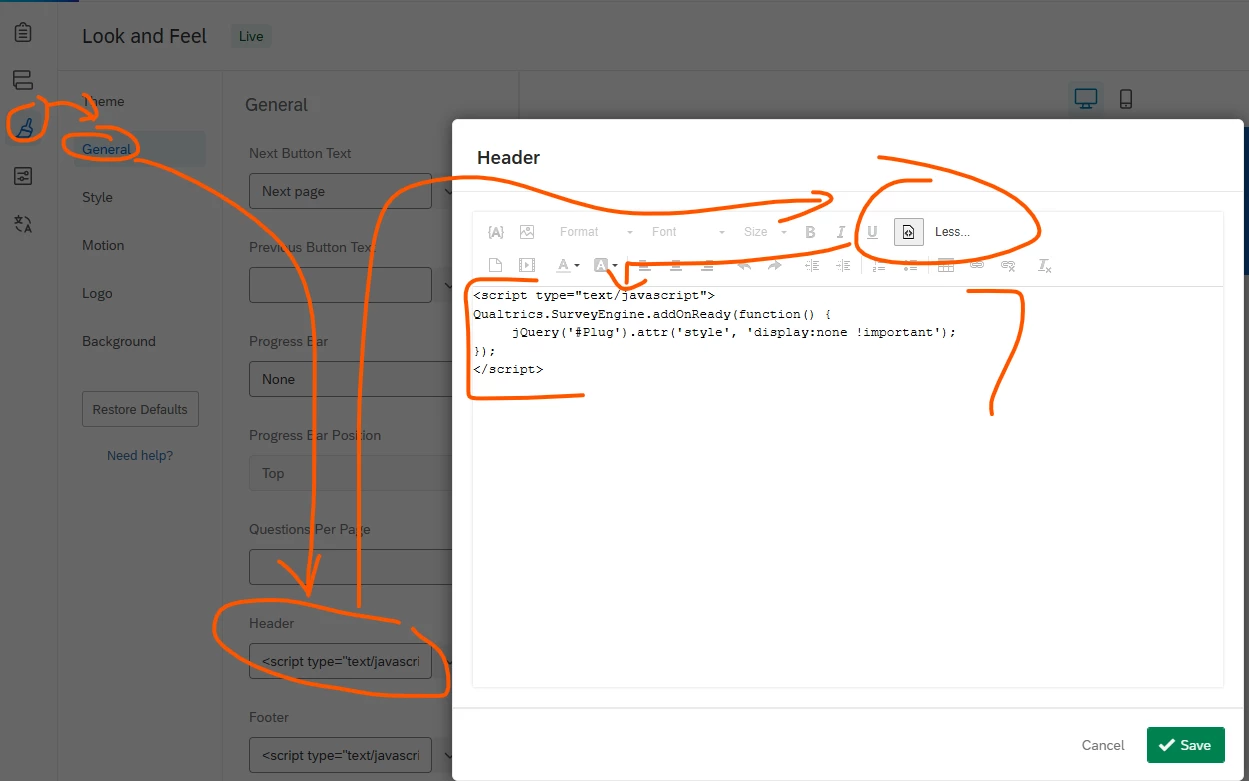
Please add the code in the Look & Feel → General → Header (edit) → Source View (<>)


Forum|alt.badge.img+2
  • Author
  • Level 2 ●●
  • Apr 28, 2025 8:53 AM UTC

Thanks ​@Shashi. Unfortunately, the code doesn’t work. I mean, it’s the same code as I have used above on each survey page. But adding it to the look&feel/header section (or footer) doesn’t have any effect. Am I doing sth. wrong?


And in the preview section of my survey, I’m still seeing the button: 


vgayraud
QPN Level 8 ●●●●●●●●
Forum|alt.badge.img+68
  • QPN Level 8 ●●●●●●●●
  • Apr 28, 2025 9:07 AM UTC

Hi,

You’re using the simple layout, use this:

<script>Qualtrics.SurveyEngine.addOnReady(function() {
var plugElement = document.getElementById('plug');
if (plugElement) {
plugElement.style.setProperty('display', 'none', 'important');
}
});</script>


Forum|alt.badge.img+2
  • Author
  • Level 2 ●●
  • Apr 28, 2025 12:06 PM UTC

Thanks ​@vgayraud . Obviously I’m still doing something wrong. So I went via “look & feel” => general => footer => edit => source view.

There I already have a footer code in there, so I tried to add your code. And this is what it looks like:

<div style="text-align: center;"><span style="font-size:12px;">This is my custom footer text <a href="https://testwhatever.com/sjhvdsavd" target="_blank">here</a>.</span></div>

<script>Qualtrics.SurveyEngine.addOnReady(function() {
var plugElement = document.getElementById('plug');
if (plugElement) {
plugElement.style.setProperty('display', 'none', 'important');
}
});</script>

But this doesn’t work, it still shows the “powered by Qualtrics” buttons.


Shashi
Level 8 ●●●●●●●●
Forum|alt.badge.img+34
  • Level 8 ●●●●●●●●
  • Apr 28, 2025 12:12 PM UTC

Try using below CSS in Look & Feel → Style → Custom CSS (edit)

.plug-container {visibility:hidden!important;}


vgayraud
QPN Level 8 ●●●●●●●●
Forum|alt.badge.img+68
  • QPN Level 8 ●●●●●●●●
  • Apr 28, 2025 12:18 PM UTC

Not sure what’s wrong. Sometimes cache can have an impact. Both your footer code and ​@Shashi ‘s CSS work fine.


Forum|alt.badge.img+2
  • Author
  • Level 2 ●●
  • Apr 28, 2025 12:58 PM UTC

Yeah, not sure either what’s wrong here. Not sure if any setting is doing sth. evil here:

  • I’m in the “engagement” module/survey
  • I’m NOT using the “new survey taking experience”
  • Theme is “blank”
  • Layout is “classic”

I tried both of your versions, i.e. the JS code in look & feel => general => header/footer edit => source view and the one with look & feel => style => custom css, but with no success.


The only thing that I get to work is my initial JS code on all survey pages (except the “end of survey” page).


vgayraud
QPN Level 8 ●●●●●●●●
Forum|alt.badge.img+68
  • QPN Level 8 ●●●●●●●●
  • Answer
  • Apr 28, 2025 1:13 PM UTC

My bad, I assumed you were using the new survey experience since there was no layout option in your look & feel screenshot above.

If you’re in vanilla classic layout, use Plug instead of plug

<div style="text-align: center;"><span style="font-size:12px;">This is my custom footer text <a href="https://testwhatever.com/sjhvdsavd" target="_blank">here</a>.</span></div>

<script>Qualtrics.SurveyEngine.addOnReady(function() {
var plugElement = document.getElementById('Plug');
if (plugElement) {
plugElement.style.setProperty('display', 'none', 'important');
}

or ​@Shashi ‘s CSS as this :

#Plug {visibility:hidden!important;}


Forum|alt.badge.img+2
  • Author
  • Level 2 ●●
  • Apr 28, 2025 5:21 PM UTC

This works, thanks a ton!