



How to Best Program (Randomize) Between-Subjects Component Nested in Within-Subjects Design | Experience Community
Skip to main content
Solved

How to Best Program (Randomize) Between-Subjects Component Nested in Within-Subjects Design

  • December 17, 2025
  • 2 replies
  • 38 views

Forum|alt.badge.img+1

Greetings!

To avoid order effects, my team and I need to randomize conditions, groups, and blocks in several ways. Unfortunately, this complexity of Qualtrics programming falls outside of my current repertoire and what I have been able to find on YouTube and by poking around on this community site. I’m crossing my fingers and toes the Qualtrics community “hive mind” can save the day.

We are doing a mixed design, with an overall within-subjects design (two conditions: A, B) that each have three components (1, 2, 3) with a between-subjects aspect in component 3. In component 3, participants need to be randomized to one of three valanced conditions (X, Y, Z).

Within both main conditions (A, B) participants need to see the three components in a chronological, specific order (1, 2, 3) and some of these components have groups (1 and 3 only, not 2). For simplicity’s sake I will only describe A.

For A1, participants need to see all three valences (X, Y, Z) and there are two question blocks for each stimulus. For A2, participants need to see all three valences (X, Y, Z) but there is only one block per stimulus. For A3, participants need to be randomized to only one valanced condition, A3X, A3Y, or A3X, which each have 4-6 stimuli per condition and three blocks of questions per stimulus. 

Specifically, within A3X, A3Y, and A3X, participants need to be shown several groups of question ratings, each block has the same stimulus at the beginning followed by relevant questions (so that we can randomize certain questions within each individual block).


Here is the general survey flow (I know I am missing important programming elements):
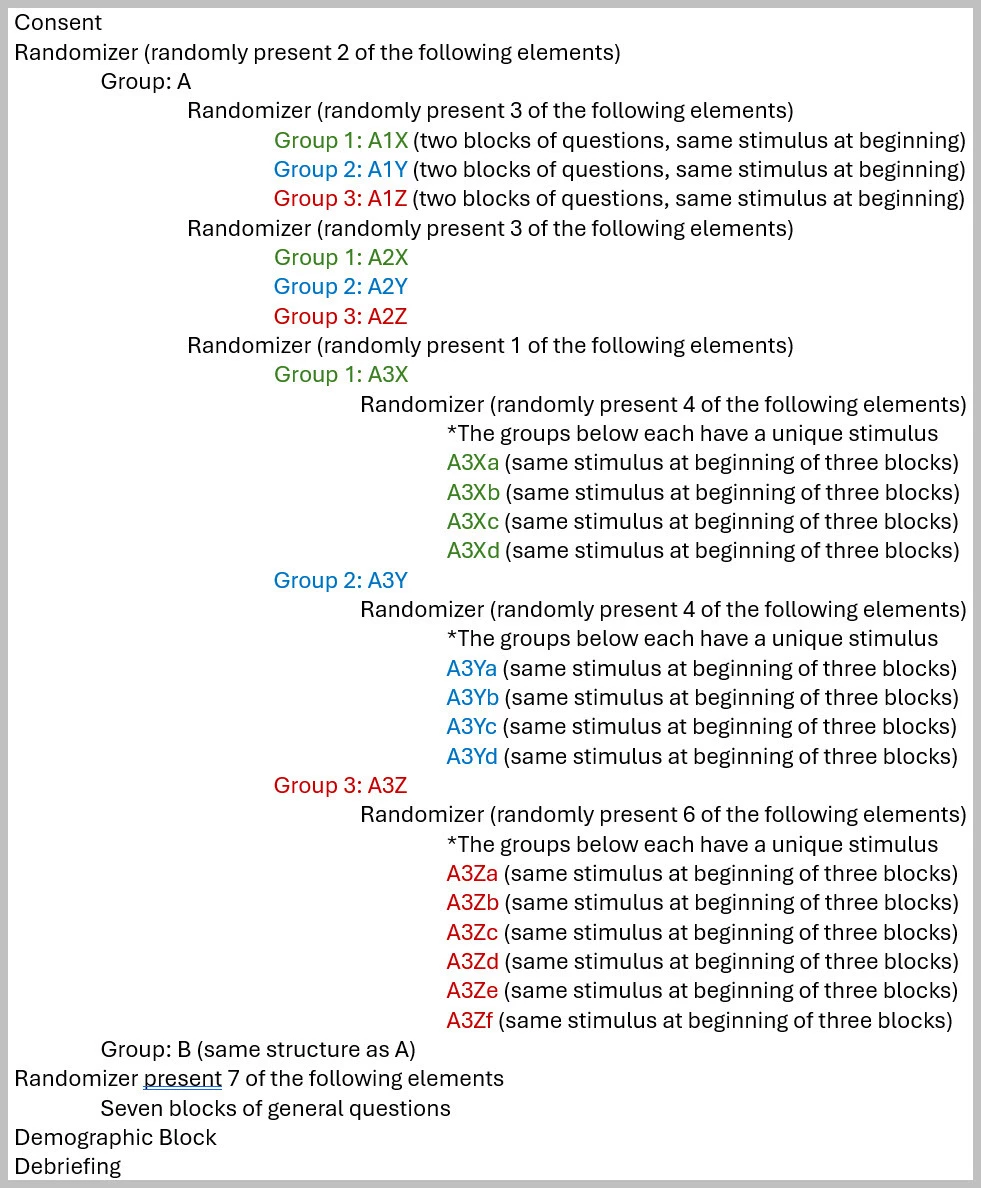
 

Any guidance on how to program this study (or changes I need to make) based on what I’ve described would be GREATLY appreciated. Thank you in advance for any time, effort, and attention to my question, including just reading this post! 🙏🏽


With gratitude,
Rachelle

Best answer by Lpena

Hello, RGenthos!
 

Setting up a complex mixed design like this in Qualtrics definitely requires some careful layering in your Survey Flow. The best way to handle it is by using the Randomizer and Group elements together with Embedded Data to keep everything organized. 📊

You’ll want to start with your standard blocks for things like consent and demographics. From there, you can create separate blocks for your main within-subject conditions (A and B). To keep the components (1, 2, and 3) in that specific fixed order, just group those blocks together. For the parts where you need to show all valences (like A1 and A2), you can just stack those blocks chronologically within the group.

When you get to the between-subjects portion in component 3, that’s where the Randomizer comes in handy. You can nest it within your flow to randomly assign participants to just one valence (X, Y, or Z). Using Embedded Data here is a lifesaver for tracking which path a participant took, which makes your data analysis much cleaner later on. If you're randomizing questions but need to keep them tied to specific stimuli, Qualtrics’ advanced randomization features within the block settings will let you lock certain elements in place while shuffling others. 🛠️

These multi-layered flows can get pretty tricky to map out perfectly on the first try. If you run into any weird branching issues or need someone to take a look at your specific logic setup, it’s worth reaching out to the experts at the Customer Success Hub over at https://support-portal.qualtrics.com/. They can dive into the back end of your survey to make sure your randomization is firing exactly how you intended. 😬

2 replies

Lpena
Qualtrics Employee
Forum|alt.badge.img+3
  • Qualtrics Employee
  • Answer
  • January 6, 2026

Hello, RGenthos!
 

Setting up a complex mixed design like this in Qualtrics definitely requires some careful layering in your Survey Flow. The best way to handle it is by using the Randomizer and Group elements together with Embedded Data to keep everything organized. 📊

You’ll want to start with your standard blocks for things like consent and demographics. From there, you can create separate blocks for your main within-subject conditions (A and B). To keep the components (1, 2, and 3) in that specific fixed order, just group those blocks together. For the parts where you need to show all valences (like A1 and A2), you can just stack those blocks chronologically within the group.

When you get to the between-subjects portion in component 3, that’s where the Randomizer comes in handy. You can nest it within your flow to randomly assign participants to just one valence (X, Y, or Z). Using Embedded Data here is a lifesaver for tracking which path a participant took, which makes your data analysis much cleaner later on. If you're randomizing questions but need to keep them tied to specific stimuli, Qualtrics’ advanced randomization features within the block settings will let you lock certain elements in place while shuffling others. 🛠️

These multi-layered flows can get pretty tricky to map out perfectly on the first try. If you run into any weird branching issues or need someone to take a look at your specific logic setup, it’s worth reaching out to the experts at the Customer Success Hub over at https://support-portal.qualtrics.com/. They can dive into the back end of your survey to make sure your randomization is firing exactly how you intended. 😬


Forum|alt.badge.img+1
  • Author
  • January 14, 2026

Hi Lpena,

Wow! Thank you so much for your reply. From what you describe it sounds like I’ve got everything structured correctly I just need to dig into the “Embedded Data” element a bit more, as I’ve never used that feature. The option of advanced randomization has been amazing for the set up of this particular project. I will definitely reach out to customer support once I feel like I’ve got everything properly sorted. 

I greatly appreciate your time, attention, and energy! 🙏🏽


Rachelle


