

progress bar | Experience Community
Skip to main content
Question

progress bar

  • May 14, 2026
  • 6 replies
  • 54 views

PeeyushBansal
Level 7 ●●●●●●●
Forum|alt.badge.img+50

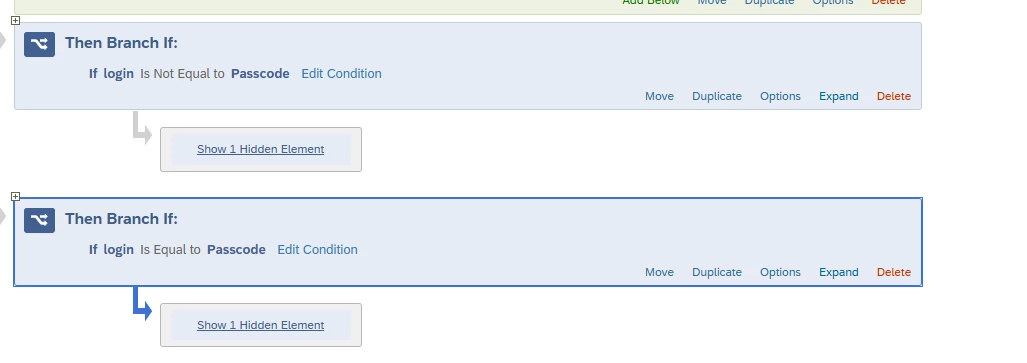
I have two blocks in flow and it looks like

if (login=Passcode) >» Block 1>>finish

if (login!=Passcode) » Block 2 >>finish


But I dont want progress bar to contradict each other, just want to start progress bar seprate for each block and not count in each other. How can it be done?


6 replies

Forum|alt.badge.img+4

My recommendation would be to remove the progress bar because it doesn’t adapt to the questions being displayed. It follows the order of the full survey, which is why it may show 20% and then on the next question jump to 89% or even say “finish.”


Forum|alt.badge.img+27

There is a past thread that should resolve your issue where TomG suggest using 

jQuery("div.ProgressBarFill").css("width", assignedProgress+"%")

Hope this helps.


PeeyushBansal
Level 7 ●●●●●●●
Forum|alt.badge.img+50
  • Author
  • Level 7 ●●●●●●●
  • May 15, 2026

This is to show numbers but for my survey when respondent only start from block 2, it starts progress bar from 50%.

@TomG is it possible to show progress bar mutually exclusive for two survey element both have their own end of survey. block 1 is for one country and block 2 is for another country in same survey.


TomG
Level 8 ●●●●●●●●
Forum|alt.badge.img+27
  • Level 8 ●●●●●●●●
  • May 15, 2026

This is to show numbers but for my survey when respondent only start from block 2, it starts progress bar from 50%.

@TomG is it possible to show progress bar mutually exclusive for two survey element both have their own end of survey. block 1 is for one country and block 2 is for another country in same survey.

Based on whether it is block1 or block2 you can scale the percentage, then update the progress bar. For example:

Qualtrics.SurveyEngine.addOnload(function() {
var pbar = jQuery(".ProgressBarFill"), pbarc = jQuery(".ProgressBarContainer"), assignedProgress;
if(block1) assignedProgress = ((pbar.width() / pbarc.width()) * 100) * 2;
else assignedProgress = ((pbar.width() / pbarc.width()) * 100 - 50) * 2;
pbar.css("width", assignedProgress+"%");
});

In the above you would change ‘block1’ to the appropriate condition to check the country.


PeeyushBansal
Level 7 ●●●●●●●
Forum|alt.badge.img+50
  • Author
  • Level 7 ●●●●●●●
  • May 18, 2026

user on cmmunity write 

Based on whether it is block1 or block2 you can scale the percentage, then update the progress bar. For example:


Qualtrics.SurveyEngine.addOnload(function() {

var pbar = jQuery(".ProgressBarFill"), pbarc = jQuery(".ProgressBarContainer"), assignedProgress;

if(block1) assignedProgress = ((pbar.width() / pbarc.width()) * 100) * 2;

else assignedProgress = ((pbar.width() / pbarc.width()) * 100 - 50) * 2;

pbar.css("width", assignedProgress+"%");

});

In the above you would change ‘block1’ to the appropriate condition to check the country.


PeeyushBansal
Level 7 ●●●●●●●
Forum|alt.badge.img+50
  • Author
  • Level 7 ●●●●●●●
  • May 18, 2026

Hi ​@TomG , it is not working and progress bar is not moving, my survey looks like below, user will see only 1 brach. for example if login=Passcode progressbar start at 50% and oppositely if login is not equal passcode it finish at 50% and jump to 100.