Hello,
I am trying to re-upload a date field from a csv into Qualtrics so that it matches the format of my date optioned embedded data field ${date://CurrentDate/DS}. I am doing this with hopes that I can have one FILTERABLE date location that doesn't get messed up during uploads like the Metadata date fields do. I have tried so many formats in an effort to upload but it just won't allow me to successfully import. If I open my data in a text editor for that column it shows the format 2020-09-17 17:13:56 (although excel recognizes any date field as m/d/yy h:mm) How do I have to format my cells so that it will import? I have tried several ways including YYYY-MM-MM HH:mm:ss. Also, is there anything that can be done with ${date://CurrentDate/DS} such as using -6 or something to account for the UTC time difference format? How would that be written? This isn't a must for me, but it would be nice as our department likes to filter by an accurate timestamp.

Date Re-Upload Issues


 +11
+11Best answer by PraDeepKotian_XM
I used to follow the format yyyy-mm-dd HH:mm:ss and its works well for me however, in some cases to getting the date in this format is a complex task. I usually try saving the csv file in csv UTF-8 format so that it retains the format even after we close the csv file.






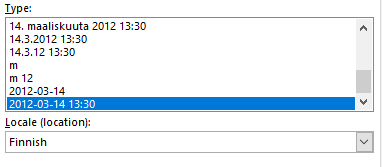 The funny thing is that I set the date in this format in a csv file, save and do not close the file. For some reason if I close it before uploading, the date format goes completely wrong🙄

Sign up
Already have an account? Login

Welcome! To join the Qualtrics Experience Community, log in with your existing Qualtrics credentials below.
Confirm your username, share a bit about yourself, Once your account has been approved by our admins then you're ready to explore and connect .
Free trial account? No problem. Log in with your trial credentials to join.
No free trial account? No problem! Register here
Already a member? Hi and welcome back! We're glad you're here 🙂
You will see the Qualtrics login page briefly before being taken to the Experience Community
Login with Qualtrics
Welcome! To join the Qualtrics Experience Community, log in with your existing Qualtrics credentials below.
Confirm your username, share a bit about yourself, Once your account has been approved by our admins then you're ready to explore and connect .
Free trial account? No problem. Log in with your trial credentials to join. No free trial account? No problem! Register here
Already a member? Hi and welcome back! We're glad you're here 🙂
You will see the Qualtrics login page briefly before being taken to the Experience Community
Login to the Community
Welcome! To join the Qualtrics Experience Community, log in with your existing Qualtrics credentials below.
Confirm your username, share a bit about yourself, Once your account has been approved by our admins then you're ready to explore and connect .
Free trial account? No problem. Log in with your trial credentials to join.
No free trial account? No problem! Register here
Already a member? Hi and welcome back! We're glad you're here 🙂
You will see the Qualtrics login page briefly before being taken to the Experience Community
Login with Qualtrics
Welcome! To join the Qualtrics Experience Community, log in with your existing Qualtrics credentials below.
Confirm your username, share a bit about yourself, Once your account has been approved by our admins then you're ready to explore and connect .
Free trial account? No problem. Log in with your trial credentials to join. No free trial account? No problem! Register here
Already a member? Hi and welcome back! We're glad you're here 🙂
You will see the Qualtrics login page briefly before being taken to the Experience Community
Enter your E-mail address. We'll send you an e-mail with instructions to reset your password.