 The javascript to select the radio button works fine and looks like this:
jQuery( "input[name='QR\\~QID2']:nth(0)" ).prop('checked', true); // auto-selects the 'Yes' option in the 'Autoselected from the last question' question.
However I have tried every combination I can think of when trying to deselect the radio button in the next question 'Reset previous question response' (using the click event on this question). I have tried:
jQuery( "input[name='QR\\~QID2']" ).prop('checked', false); // does not work
jQuery( "input[name='QR\\~QID2']" ).attr('checked', false); // does not work
jQuery( "input[name='QR\\~QID2']" ).checked = false; // does not work
jQuery( "input[name='QR\\~QID2']:nth(0)" ).prop('checked', false); // does not work
Is this because of the way the radio buttons are built in Qualtrics (since they do not simply use the standard input field to display the buttons; there is a label element that seems to handle the display end)?
The Qualtrics.SurveyEngine API seems out of the question since I am trying to control an element/question that is not the one I am selecting (eg. I am using the click event of the third question to reset the selection of the second question).
The javascript to select the radio button works fine and looks like this:
jQuery( "input[name='QR\\~QID2']:nth(0)" ).prop('checked', true); // auto-selects the 'Yes' option in the 'Autoselected from the last question' question.
However I have tried every combination I can think of when trying to deselect the radio button in the next question 'Reset previous question response' (using the click event on this question). I have tried:
jQuery( "input[name='QR\\~QID2']" ).prop('checked', false); // does not work
jQuery( "input[name='QR\\~QID2']" ).attr('checked', false); // does not work
jQuery( "input[name='QR\\~QID2']" ).checked = false; // does not work
jQuery( "input[name='QR\\~QID2']:nth(0)" ).prop('checked', false); // does not work
Is this because of the way the radio buttons are built in Qualtrics (since they do not simply use the standard input field to display the buttons; there is a label element that seems to handle the display end)?
The Qualtrics.SurveyEngine API seems out of the question since I am trying to control an element/question that is not the one I am selecting (eg. I am using the click event of the third question to reset the selection of the second question).
Solved
Not able to reset selected radio buttons using javascript


 +13
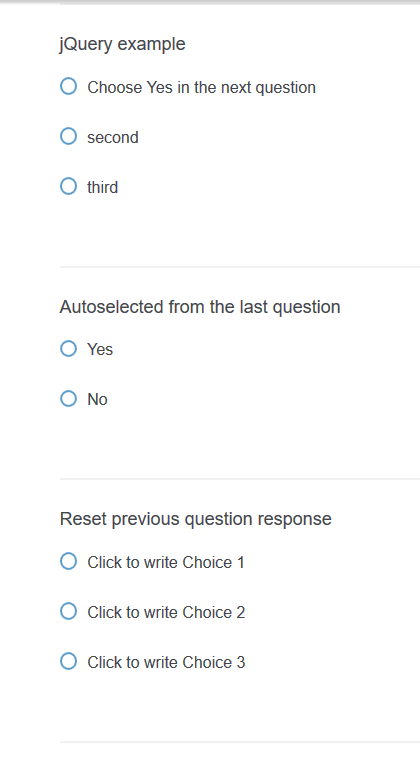
+13I have a survey question 'jQuery example' that sets the radio button of another question 'Autoselected from the last question' (screenshot of the form shown below):
!
The javascript to select the radio button works fine and looks like this:
jQuery( "input[name='QR\\~QID2']:nth(0)" ).prop('checked', true); // auto-selects the 'Yes' option in the 'Autoselected from the last question' question.
However I have tried every combination I can think of when trying to deselect the radio button in the next question 'Reset previous question response' (using the click event on this question). I have tried:
jQuery( "input[name='QR\\~QID2']" ).prop('checked', false); // does not work
jQuery( "input[name='QR\\~QID2']" ).attr('checked', false); // does not work
jQuery( "input[name='QR\\~QID2']" ).checked = false; // does not work
jQuery( "input[name='QR\\~QID2']:nth(0)" ).prop('checked', false); // does not work
Is this because of the way the radio buttons are built in Qualtrics (since they do not simply use the standard input field to display the buttons; there is a label element that seems to handle the display end)?
The Qualtrics.SurveyEngine API seems out of the question since I am trying to control an element/question that is not the one I am selecting (eg. I am using the click event of the third question to reset the selection of the second question).
The javascript to select the radio button works fine and looks like this:
jQuery( "input[name='QR\\~QID2']:nth(0)" ).prop('checked', true); // auto-selects the 'Yes' option in the 'Autoselected from the last question' question.
However I have tried every combination I can think of when trying to deselect the radio button in the next question 'Reset previous question response' (using the click event on this question). I have tried:
jQuery( "input[name='QR\\~QID2']" ).prop('checked', false); // does not work
jQuery( "input[name='QR\\~QID2']" ).attr('checked', false); // does not work
jQuery( "input[name='QR\\~QID2']" ).checked = false; // does not work
jQuery( "input[name='QR\\~QID2']:nth(0)" ).prop('checked', false); // does not work
Is this because of the way the radio buttons are built in Qualtrics (since they do not simply use the standard input field to display the buttons; there is a label element that seems to handle the display end)?
The Qualtrics.SurveyEngine API seems out of the question since I am trying to control an element/question that is not the one I am selecting (eg. I am using the click event of the third question to reset the selection of the second question).Best answer by w.patrick.gale
Since the radio button groups were giving me so much trouble I switched to using a dropdown list and I was able to work with that. So to select the first item in a dropdown list using jQuery you would use something like:
jQuery( "select[name='QR\\~QID2']" ).val(1); // where val(1) is the first value in the dropdown list, val(2) would be the second, etc.
...and to reset to the empty/null value simply change the 'value' in the above line to:
jQuery( "select[name='QR\\~QID2']" ).val(0); // .val(-1) also seemed to work the same way



Sign up
Already have an account? Login

Welcome! To join the Qualtrics Experience Community, log in with your existing Qualtrics credentials below.
Confirm your username, share a bit about yourself, Once your account has been approved by our admins then you're ready to explore and connect .
Free trial account? No problem. Log in with your trial credentials to join.
No free trial account? No problem! Register here
Already a member? Hi and welcome back! We're glad you're here 🙂
You will see the Qualtrics login page briefly before being taken to the Experience Community
Login with Qualtrics
Welcome! To join the Qualtrics Experience Community, log in with your existing Qualtrics credentials below.
Confirm your username, share a bit about yourself, Once your account has been approved by our admins then you're ready to explore and connect .
Free trial account? No problem. Log in with your trial credentials to join. No free trial account? No problem! Register here
Already a member? Hi and welcome back! We're glad you're here 🙂
You will see the Qualtrics login page briefly before being taken to the Experience Community
Login to the Community
Welcome! To join the Qualtrics Experience Community, log in with your existing Qualtrics credentials below.
Confirm your username, share a bit about yourself, Once your account has been approved by our admins then you're ready to explore and connect .
Free trial account? No problem. Log in with your trial credentials to join.
No free trial account? No problem! Register here
Already a member? Hi and welcome back! We're glad you're here 🙂
You will see the Qualtrics login page briefly before being taken to the Experience Community
Login with Qualtrics
Welcome! To join the Qualtrics Experience Community, log in with your existing Qualtrics credentials below.
Confirm your username, share a bit about yourself, Once your account has been approved by our admins then you're ready to explore and connect .
Free trial account? No problem. Log in with your trial credentials to join. No free trial account? No problem! Register here
Already a member? Hi and welcome back! We're glad you're here 🙂
You will see the Qualtrics login page briefly before being taken to the Experience Community
Enter your E-mail address. We'll send you an e-mail with instructions to reset your password.