Retrigger survey if no responce | Experience Community
Skip to main content
Question

Retrigger survey if no responce

  • July 3, 2026
  • 3 replies
  • 27 views

Forum|alt.badge.img+10

Hi Team,

We have the following requirement:

  • When a contact is uploaded, a ticket should be created automatically, and the survey should be distributed.
  • If the contact submits a survey response, the corresponding ticket should be closed automatically. this we have configured and currently active 
  • If no survey response is received, the ticket owner will manually close the ticket.
  • Upon manually closing the ticket, the survey should be re-triggered only for that specific contact who has not yet responded. how to achieve this?

To test this, I configured a follow-up question in the ticket task named "Manual Closure". I submitted the ticket with the answer "Yes"; however, I do not see this follow-up question available in the Decision step of the workflow.

Could you please help clarify the following?

  1. Why is the "Manual Closure" question not available in the Decision step after the ticket is submitted?
  2. How can we configure the workflow to identify only those contacts who have not submitted a survey response?
  3. Is it possible to automatically re-trigger the survey only for the contact whose ticket was manually closed, without sending the survey to all contacts?
  4. If this is not possible using standard Qualtrics workflows, is there a recommended approach (such as using APIs or custom code) to achieve this requirement?

Any guidance on the best approach to implement this requirement would be greatly appreciated.

3 replies

Forum|alt.badge.img+3
  • Level 2 ●●
  • July 6, 2026

By “re-trigger the survey” I assume you mean resend the invite.

You can create a workflow that is triggered by a number of ticket events, including status change:


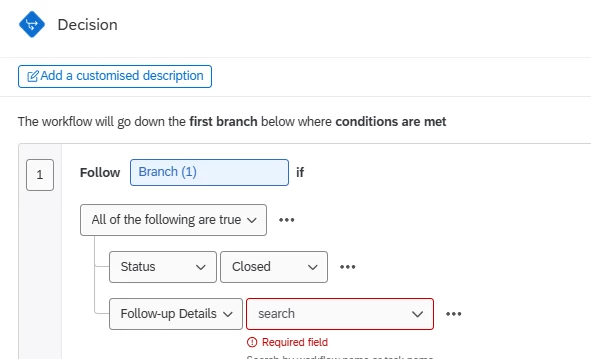
In the follow-up details you can add a checkbox for manual closure and use it in the condition.


Forum|alt.badge.img+10
  • Author
  • QPN Level 3 ●●●
  • July 6, 2026

Hi ​@zzh ,

I have already tried the same approach using the Status Closed and Follow-up Details conditions. We were able to add the follow-up question and successfully create a ticket that includes the follow-up question. However, we have not received any workflow execution hit—neither success nor failure.

I wanted to check whether the Ticket Event trigger works for tickets that are created based on Contact Creation. While configuring the workflow, the Ticket Event requires us to select a project name. However, in our case, the ticket is not created from a survey project; it is created during the contact creation process.

Could you please confirm whether the Ticket Event supports this type of ticket creation, or if there is a different approach we should follow


vgayraud
QPN Level 7 ●●●●●●●
Forum|alt.badge.img+65
  • QPN Level 7 ●●●●●●●
  • July 6, 2026

Hi,

When you create your ticket, pass the ContactID as ticket data.

In your stand-alone workflow started on ticket event, don’t choose any project, just hit Next. Program your conditions as wanted, and then add a web service element to call https://api.qualtrics.com/7ea3dc78686b9-retrieve-ticket. and retrieve the ContactID. You can then use it in a survey distribution.

Note that this is not creating a reminder, but an entirely new distribution.