Student portfolio and Supervisor response | Experience Community
Skip to main content
Question

Student portfolio and Supervisor response

  • April 22, 2026
  • 4 replies
  • 35 views

Forum|alt.badge.img+1

Hi All, I am sure this has been done before BUT…..

I would like to generate a survey that:

  1. Our students out on placement can complete by clicking a link.
  2. Once they complete the survey I would like the survey to then be sent to the placement supervisor for approval
  3. I would then like The placement supervisor to be able to read and approve the students original survey - BUT the student obviously cannot originally see the approval section (2 surveys?)
  4. We then see the data from the placement supervisors approval / failure
  5. there are MANY students (hundreds spread over 4 years of the course) and many placement sites to consider.

I have had a browse and THINK the way is embedded data in the student and a second supervisor surveys??? 

Do you have any advice or know of simpler ways of doing this? this is currently paper based 

Steve

4 replies

kgillis
Level 6 ●●●●●●
Forum|alt.badge.img+31
  • Level 6 ●●●●●●
  • April 22, 2026

@Steve_Darby do you want the student to see if the placement was or wasn’t approved? Also how many approval supervisors are there? If more than 1 how are they determined who gets assigned to which students? I think this is all very doable - but need these pieces of information as it’ll help determine how we build it out. 


Forum|alt.badge.img+26

Assuming you have supervisor data such as name, email and/or other possible data included into the survey through the student’s mailing list as embedded data or asked within the survey questions:

Technically, you can build a workflow that sends retake links to a supervisor’s email.

This will allow the supervisor to view the inputs of students within one survey project.

However, there exists a possibility where supervisor edits the student’s input, which may affect the validity of the inputs.


kgillis
Level 6 ●●●●●●
Forum|alt.badge.img+31
  • Level 6 ●●●●●●
  • April 24, 2026

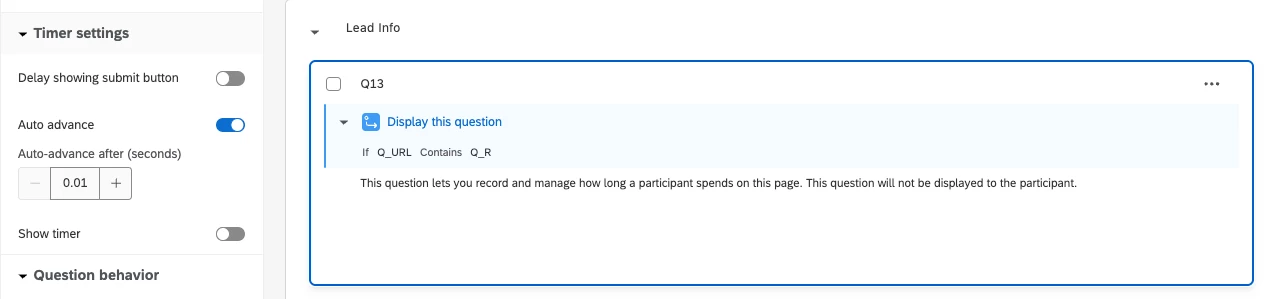
@Chee Heng_SZ you can get around the “issue” of having the possibility to edits the students input by adding display logic of “Q_URL contains Q_R” and then have the approval on a separate block. And then in the block with the students block of questions throw a timing question at the top and add in auto-advance. Technically it still shows it in a quick flash, but it’s so fast that you can’t get anything from it - also be sure to disable the back button so the person seeing the 2nd part can’t go back to see the 1st block.

I had a similar issue where I did not want the original responses to be potentially edited and this was my work around. PLUS if the 2nd respondent needs to see part of the original response then you can just pipe it in in the 2nd block using text/graphic type question.


Forum|alt.badge.img+1
  • Author
  • April 28, 2026

@Steve_Darby do you want the student to see if the placement was or wasn’t approved? Also how many approval supervisors are there? If more than 1 how are they determined who gets assigned to which students? I think this is all very doable - but need these pieces of information as it’ll help determine how we build it out. 

Hi, Thanks for the response,

  • No we wouldnt want the students to see the approval this would come to us via qualtrics at that point. The result would be loaded onto a VLE (canvas) for release at a later point
  • MANY sites but only one supervisor per student at each site

Thanks for any advice.