


How to add static text after a text entry box?



Best answer by Clint
With the addition of some JavaScript on the question, you can get this done. This example shows how to put text on either side of the text entry box. https://gist.github.com/13bzhang/92be517b6558132c78620ad029c77f4d
Qualtrics.SurveyEngine.addOnload(function() { /*Place Your Javascript Below This Line*/ var inputs = $(this.getQuestionContainer()).select('input[type="text"]'); for (var i = 0; i < inputs.length; i++) { var input = inputs[i]; $(input).insert({before: 'In '}); $(input).insert({after: ' years'}); } });
















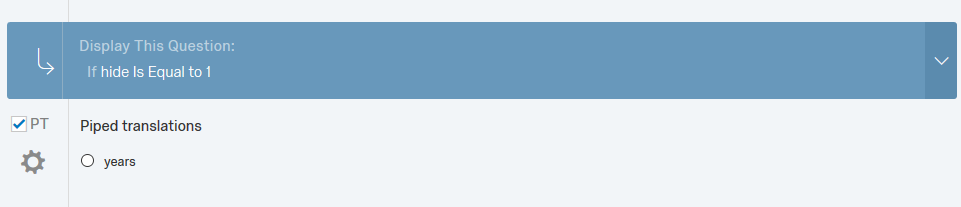 Then pipe the choice text into your JavaScript (using the appropriate QID):
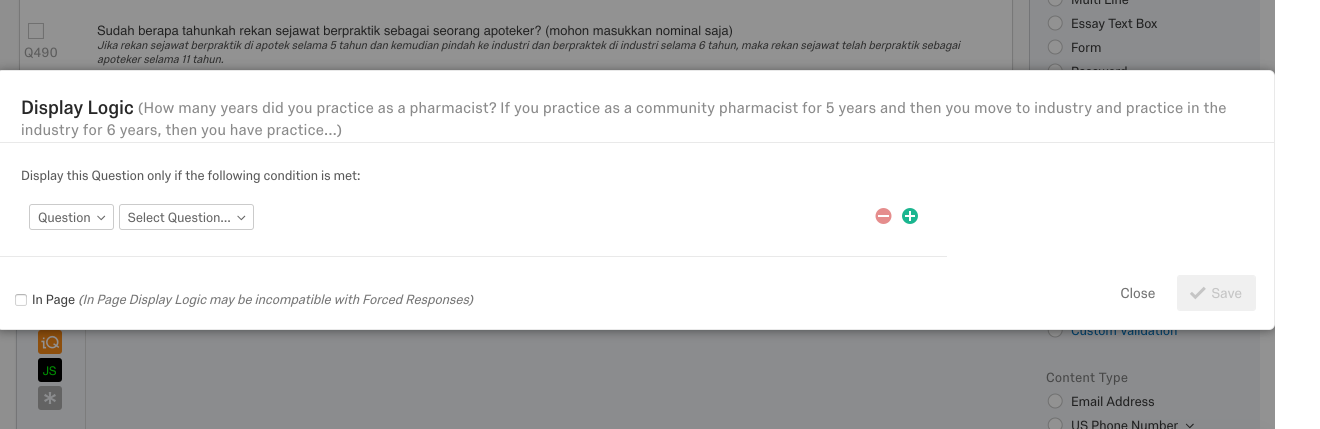
 Hi Tom, I am sorry, I think do not understand with what you mention above. How do I choose the display logic? I attach you the picture of my questions and my translation. Basically, I will show my questionnaire in Indonesia language, which I already put static text, which is "tahun". But I could not put static text in my English language, which should be "years".
Thank you for your help.
Hi Tom, I am sorry, I think do not understand with what you mention above. How do I choose the display logic? I attach you the picture of my questions and my translation. Basically, I will show my questionnaire in Indonesia language, which I already put static text, which is "tahun". But I could not put static text in my English language, which should be "years".
Thank you for your help.
 Thank you.
Sign up
Already have an account? Login

Welcome! To join the Qualtrics Experience Community, log in with your existing Qualtrics credentials below.
Confirm your username, share a bit about yourself, then you're ready to explore and connect .
Free trial account? No problem. Log in with your trial credentials to join.
No free trial account? No problem! Register here
Already a member? Hi and welcome back! We're glad you're here 🙂
You will see the Qualtrics login page briefly before being taken to the Experience Community.
Login with Qualtrics
Welcome! To join the Qualtrics Experience Community, log in with your existing Qualtrics credentials below.
Confirm your username, share a bit about yourself, then you're ready to explore and connect .
Free trial account? No problem. Log in with your trial credentials to join. No free trial account? No problem! Register here
Already a member? Hi and welcome back! We're glad you're here 🙂
You will see the Qualtrics login page briefly before being taken to the Experience Community.
Login to the Community
Welcome! To join the Qualtrics Experience Community, log in with your existing Qualtrics credentials below.
Confirm your username, share a bit about yourself, then you're ready to explore and connect .
Free trial account? No problem. Log in with your trial credentials to join.
No free trial account? No problem! Register here
Already a member? Hi and welcome back! We're glad you're here 🙂
You will see the Qualtrics login page briefly before being taken to the Experience Community.
Login with Qualtrics
Welcome! To join the Qualtrics Experience Community, log in with your existing Qualtrics credentials below.
Confirm your username, share a bit about yourself, then you're ready to explore and connect .
Free trial account? No problem. Log in with your trial credentials to join. No free trial account? No problem! Register here
Already a member? Hi and welcome back! We're glad you're here 🙂
You will see the Qualtrics login page briefly before being taken to the Experience Community.
Enter your E-mail address. We'll send you an e-mail with instructions to reset your password.