



Shape the Future of In-Product Help | Experience Community
Skip to main content

Shape the Future of In-Product Help

  • June 8, 2026
  • 5 replies
  • 68 views
AlonsoC
Administrator
Forum|alt.badge.img+29


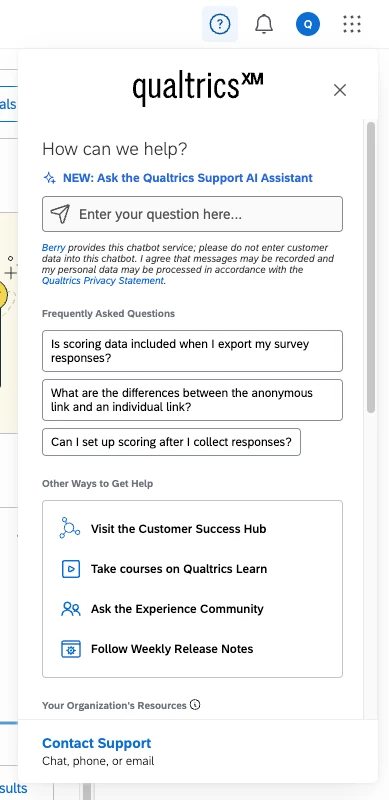
The Qualtrics product is always evolving, and so are the ways you use it. The in-product dynamic help window as seen above (the ❓ in the top right-hand corner of the Qualtrics platform) is your always-on resource for functionality questions and troubleshooting while building in Qualtrics. We’d love to hear how you actually use it in real life, and what works (or doesn’t) for your role and your organization.

Tell us your experience:

  • Do you use the in-product help window? If yes, how often? If you rarely or never open it, what do you use instead (support site, Community, your own AI assistant, peers, etc.)?
  • What do you use it for? (Quick answers, FAQs for where you are, articles in the panel, the Support AI Assistant, a path to support, internal admin content—anything else?)
  • What do you love about it today, and what do you wish for? This could be content, layout or discoverability, how answers or articles behave in the panel, gaps for power users vs. new users, language or accessibility, or anything that would save you time the next time you’re building or troubleshooting in Qualtrics.

Drop a comment! (Concrete examples are gold). Your replies help us understand how people really get unstuck in the product—and what would make that experience better.


Thank you for taking the time to share! 

5 replies

Forum|alt.badge.img+6
  • Do you use the in-product help window? Yes, I use it often. As a Brand Admin, I use it throughout the week, potentially more than once a day depending.
  • What do you use it for? I use it to inquire to find answers to questions. It can also help, even if I know the answer, to ask because the response helps me respond to someone else.
  • What do you love about it today, and what do you wish for? One of the concerns with AI tools is that it won’t be accurate. The Qualtrics Support AI Assistant is actually quite helpful and a great resource. It’s not always perfect, but it does a really good job responding to questions. It could possibly use some improvement when it comes to understanding different aspects of the platform (i.e. CX features vs. EX features) because that could impact the answer, but not a major concern. Thanks for seeking feedback! 

Forum|alt.badge.img
  • Qualtrics Employee
  • June 8, 2026

@CRQualtrics Thanks for sharing this! I’m Chelsea, Product Manager over the help window, and this is super helpful as we plan what’s next for the product. A few things stood out to me from your comment:

  • You use help both to get unstuck and to answer questions for others. That’s exactly the kind of admin/power-user workflow we want the help window to support better, not solely one-off self-serve for builders.
  • The Support AI Assistant is working well for you. That’s great to hear, and it’s useful input as we keep improving how accurate and reliable those answers are!
  • CX vs. EX context: you’re right that the right answer can depend on which part of the platform you’re in (especially ones with a lot of overlap, like dashboards) and it’s something we are continuing to fine-tune to make sure the AI Assistant can provide the best answer every time.

Appreciate you taking the time to comment!


pamelalbeck
Level 5 ●●●●●
Forum|alt.badge.img+40
  • Level 5 ●●●●●
  • June 8, 2026


  • Do you use the in-product help window? Yes, but pretty infrequent.  If I had to estimate I would say once a quarter.  I use it only after I have exhausted my resources on the community or I can’t find the answer after googling it or reading through the Qualtrics Guides (such as this example: https://www.qualtrics.com/support/survey-platform/survey-module/editing-questions/question-types-guide/question-types-overview/
  • What do you use it for? As a last resort for finding an answer before I have to submit a ticket.
  • What do you love about it today, and what do you wish for? One of the concerns with AI tools is that it won’t be accurate.  Agree ​@CRQualtrics.  I also haven’t had any issues with the AI being inaccurate, but if I’m to the point I am in the help window I have an issue that is nuanced to the point I need to communicate with an actual person and go through the AI bit just to confirm.  I don’t know why I’m so resistant to put in tickets - maybe it feels like defeat that I can’t find the answer?  I do wish that there was a more direct way to just enter a ticket.

Forum|alt.badge.img
  • Qualtrics Employee
  • June 8, 2026

@pamelalbeck thanks for sharing this! I’m seeing a sequence emerge in your comment: you’ve already tried Community, searching, and the support site before you ever open help. By the time you’re in the help window, it’s not a quick “how do I…?”, it’s a nuanced question where the bar for the AI Assistant is really high, and you often already know you need a person.

I’m the same way about wanting to solve issues myself first, and having to give up and put in a ticket can feel frustrating. That’s something we’re thinking about as we plan what’s next: how to respect that self-serve instinct while still getting you to the right answer (or the right human) without extra friction.

If you have any examples handy, what do those nuanced questions usually look like for you?


pamelalbeck
Level 5 ●●●●●
Forum|alt.badge.img+40
  • Level 5 ●●●●●
  • June 9, 2026

@chelseap My last question had to do with survey logic that wasn’t working and figuring out the number of times I could run a loop and merge (I worked with Luis if that is helpful).  Often it comes down to “can I do X?  and if so, how do I make that happen?”.