 I'm quite sure that there are not such lines in images themselves. It happens with images from many different resources. I have zoomed some of these images as much as I could and there were no white lines. Moreover I've obstructed borders of one of these images with eraser in Photoshop and it didn't help. And I'm also not the only one with these lines as you can see here.
I use the "Minimal - blue" theme and don't want to change it since I have already done a lot styling within this theme.
I'm quite sure that there are not such lines in images themselves. It happens with images from many different resources. I have zoomed some of these images as much as I could and there were no white lines. Moreover I've obstructed borders of one of these images with eraser in Photoshop and it didn't help. And I'm also not the only one with these lines as you can see here.
I use the "Minimal - blue" theme and don't want to change it since I have already done a lot styling within this theme.
How to remove white lines from images inside options in multiple choice questions?


 +6
+6Hi community,
I inserted images with transparent background to my choices in some multiple choice questions. When user clicks on the choice, the background of the image changes which would look very nice. Unfortunately, there "appear" one or two white lines at the border of the image which looks terrible. Therefore I don't want to have these lines there. Would anyone have some idea how to make them disappear (and still have colored background of selected choice)?
!
I'm quite sure that there are not such lines in images themselves. It happens with images from many different resources. I have zoomed some of these images as much as I could and there were no white lines. Moreover I've obstructed borders of one of these images with eraser in Photoshop and it didn't help. And I'm also not the only one with these lines as you can see here.
I use the "Minimal - blue" theme and don't want to change it since I have already done a lot styling within this theme.
I'm quite sure that there are not such lines in images themselves. It happens with images from many different resources. I have zoomed some of these images as much as I could and there were no white lines. Moreover I've obstructed borders of one of these images with eraser in Photoshop and it didn't help. And I'm also not the only one with these lines as you can see here.
I use the "Minimal - blue" theme and don't want to change it since I have already done a lot styling within this theme.



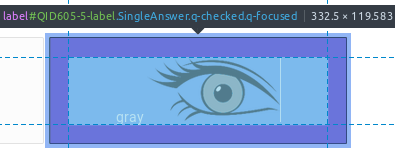 !
!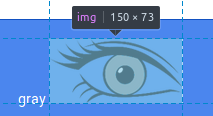 Originally, I've inserted images like this and wasn't able to modify the HTML manually, since there was no image tag when I clicked on the choice to edit it and there was also no image in the rich content editor.
!
Originally, I've inserted images like this and wasn't able to modify the HTML manually, since there was no image tag when I clicked on the choice to edit it and there was also no image in the rich content editor.
!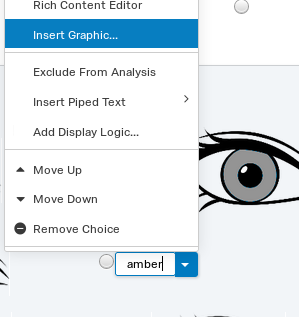 -> !
-> ! ## However, you answer gave me an idea to put the HTML img tag to the answer instead. Now there is no white line anymore.
!
## However, you answer gave me an idea to put the HTML img tag to the answer instead. Now there is no white line anymore.
!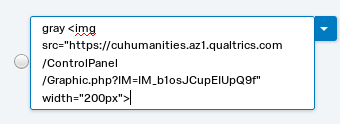 -> !
-> !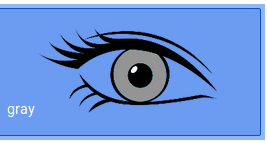 I realized, that the URLs used by these two ways are different. I think there might be problem with the image which is stored at the first URL which is different than URL which I have in my Graphics library:
`src="https://cuhumanities.az1.qualtrics.com/WRQualtricsControlPanel/Graphic.php?IM=IM_b1osJCupEIUpQ9f&thumb=true&width=150"`
`src="https://cuhumanities.az1.qualtrics.com/ControlPanel/Graphic.php?IM=IM_b1osJCupEIUpQ9f" `
Thank you very much for your help!
I realized, that the URLs used by these two ways are different. I think there might be problem with the image which is stored at the first URL which is different than URL which I have in my Graphics library:
`src="https://cuhumanities.az1.qualtrics.com/WRQualtricsControlPanel/Graphic.php?IM=IM_b1osJCupEIUpQ9f&thumb=true&width=150"`
`src="https://cuhumanities.az1.qualtrics.com/ControlPanel/Graphic.php?IM=IM_b1osJCupEIUpQ9f" `
Thank you very much for your help!
Sign up
Already have an account? Login

Welcome! To join the Qualtrics Experience Community, log in with your existing Qualtrics credentials below.
Confirm your username, share a bit about yourself, Once your account has been approved by our admins then you're ready to explore and connect .
Free trial account? No problem. Log in with your trial credentials to join.
No free trial account? No problem! Register here
Already a member? Hi and welcome back! We're glad you're here 🙂
You will see the Qualtrics login page briefly before being taken to the Experience Community
Login with Qualtrics
Welcome! To join the Qualtrics Experience Community, log in with your existing Qualtrics credentials below.
Confirm your username, share a bit about yourself, Once your account has been approved by our admins then you're ready to explore and connect .
Free trial account? No problem. Log in with your trial credentials to join. No free trial account? No problem! Register here
Already a member? Hi and welcome back! We're glad you're here 🙂
You will see the Qualtrics login page briefly before being taken to the Experience Community
Login to the Community
Welcome! To join the Qualtrics Experience Community, log in with your existing Qualtrics credentials below.
Confirm your username, share a bit about yourself, Once your account has been approved by our admins then you're ready to explore and connect .
Free trial account? No problem. Log in with your trial credentials to join.
No free trial account? No problem! Register here
Already a member? Hi and welcome back! We're glad you're here 🙂
You will see the Qualtrics login page briefly before being taken to the Experience Community
Login with Qualtrics
Welcome! To join the Qualtrics Experience Community, log in with your existing Qualtrics credentials below.
Confirm your username, share a bit about yourself, Once your account has been approved by our admins then you're ready to explore and connect .
Free trial account? No problem. Log in with your trial credentials to join. No free trial account? No problem! Register here
Already a member? Hi and welcome back! We're glad you're here 🙂
You will see the Qualtrics login page briefly before being taken to the Experience Community
Enter your E-mail address. We'll send you an e-mail with instructions to reset your password.