



Hi,
I'm struggling to use jQuery to change the padding of a multiple choice question. I've managed to move the question block about in the page successfully but I can't figure out how to write the syntax to change the padding specifically.
This is my set of questions. There is a category question and a sub category question. I have setup the sub category to only display once the category question has been selected.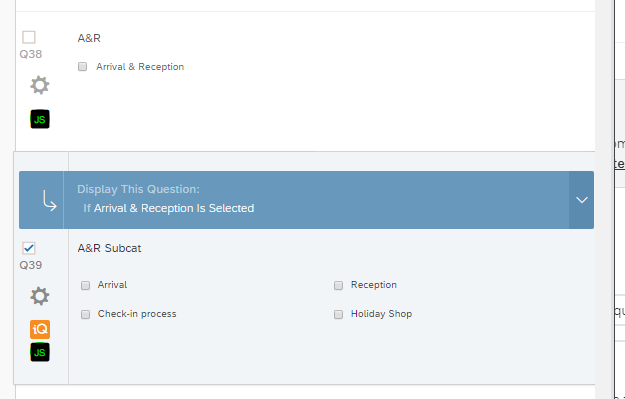 Q38 has the code (in addOnload part): It hides the actual question text, removes the separator (probably not needed now since I've changed the layout slightly and brings the questions closer together.
//category coding
jQuery("#"+this.questionId+" .QuestionText").css({display: 'none'});
jQuery("#"+this.questionId+"Separator").css({"margin": '0px'})
jQuery("#"+this.questionId+" .QuestionBody").css({"padding-bottom": '0px !important'});
jQuery("[class='QuestionOuter BorderColor MC " + this.questionId + "']").css({
"width": '80%',
"margin-top": '-3%',
"margin-bottom": '-3%'
});
Q39 (the sub category) has this code: again the separator code isn't needed now
//subcategory coding
jQuery("#"+this.questionId+" .QuestionText").css({display: 'none'});
jQuery("#"+this.questionId+"Separator").css({"margin": '0px'})
jQuery("#"+this.questionId+".QuestionOuter.BorderColor.MC."+this.questionId).css({
"margin-left": '20%',
"width": '80%',
"margin-top": '-4%',
"margin-bottom": '2%'
});
What this code gives is this: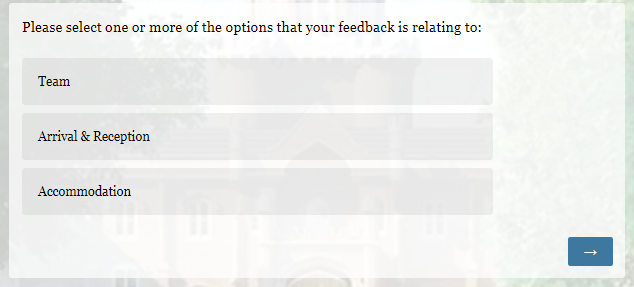 When you click on 'Arrivals & Reception' the In-page question is displayed (the sub category):
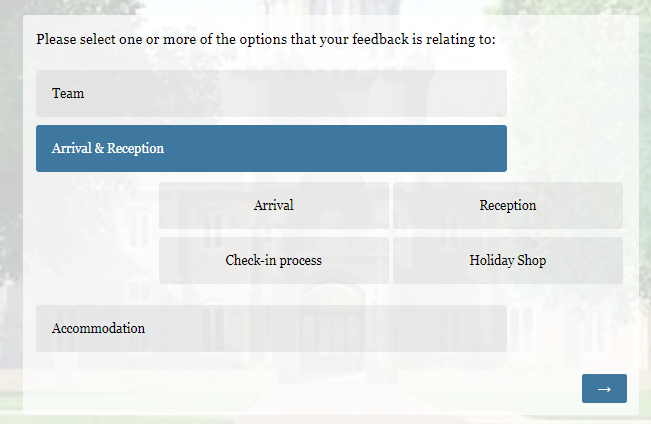
The closest I've got to make the change is using:
jQuery('.Skin label.MultipleAnswer, .Skin label.SingleAnswer').attr('style','padding:10px !important');
But this only seems to change the padding of the category questions and not the sub category question even though the code is in the sub category question. I don't know why that is. Can anyone help me change this one liner so that it only operates on this specific Question but using dynamic code (eg. this.questionId).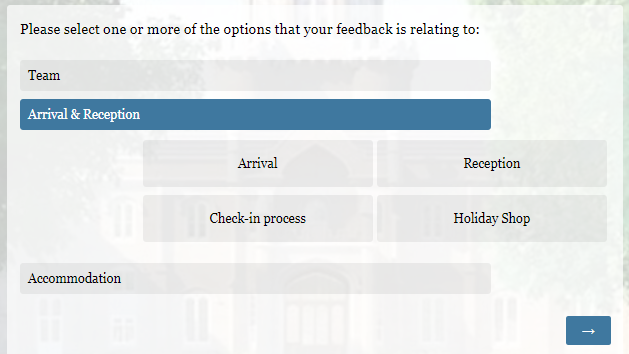
To help, below is a pic of the HTML element code for one of these multiple choice questions. Please could you help me understand how to read the class and ID needed to work on the padding of these questions. I'm normally ok with Whole questions but I've confused myself so much I'm now lost!!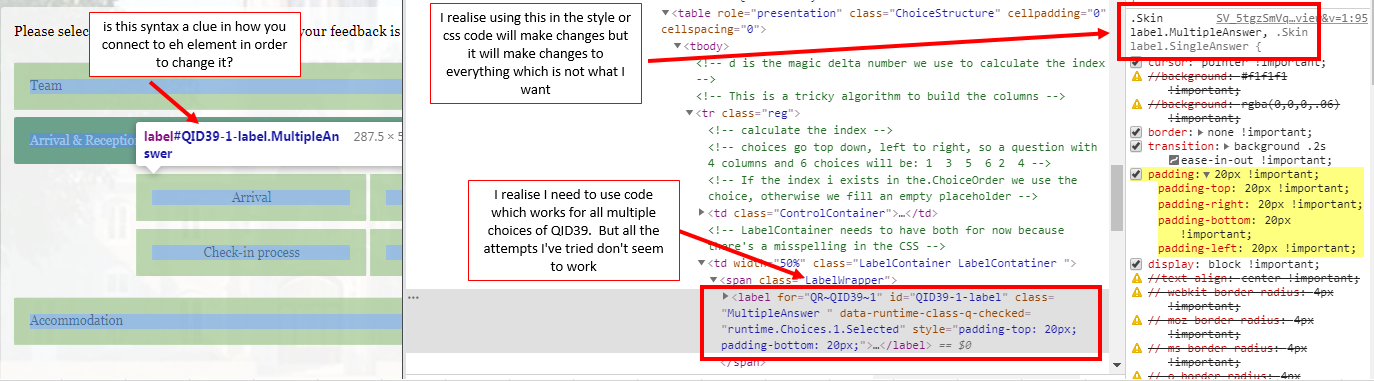 FYI, this is all the different methods I've trialled. As you can see, I've tried different variations such as adding '!important' or adding in 'QR~' to the front of the QID code. I think I ca safely say I've had a go but I am no JS / web designer so would appreciate some help.
// Everything else below here is an attempt to change the padding of the sub category question but hasn't worked
//
// jQuery("#QR~"+this.questionId+" .QuestionBody").css({"padding-bottom": 'none !important'});
// jQuery("#QR~" + this.questionId + ".MC.label").css({"padding-top": '10px !important', "padding-bottom": '10px'});
// jQuery("#QR~"+this.questionId+".label.MultipleAnswer").css({"padding-top": '10px !important',
// "padding-bottom": '10px !important'});
// jQuery("#QR~"+this.questionId+".InnerInner.BorderColor.TX").css({"padding-top": '10px !important',
// "padding-bottom": '10px !important'});
// jQuery("#QR~"+this.questionId).find('label').last().css({"padding-top": '10px !important'});
// jQuery(this.questionId).down('label').hide();
// jQuery("#QR~" + this.questionId + " .MultipleAnswer ul li:eq(0)").hide();
// jQuery("#"+this.questionId+" .Inner.BorderColor TB").css({"padding": "0px !important"});
// jQuery(".Inner").css("padding","0px");
// jQuery(".QuestionText").css("margin","0px");
//var QID = this.questionId;
//
//var QIDOtherLabel = jQuery("#QR~" + QID).find(".LabelContainer").siblings().attr("id");
//jQuery("[id='" +QIDOtherLabel+"']").css("padding-top","10px");
//jQuery("[id='" +QIDOtherLabel+"']").css("padding-bottom","10px");
//jQuery(this).parent().find(".MultipleAnswer").attr('style','padding:10px !important');
Thanks
Rod

Change the padding in multiple choice questions
Sign up
Already have an account? Login

Welcome! To join the Qualtrics Experience Community, log in with your existing Qualtrics credentials below.
Confirm your username, share a bit about yourself, then you're ready to explore and connect .
Free trial account? No problem. Log in with your trial credentials to join.
No free trial account? No problem! Register here
Already a member? Hi and welcome back! We're glad you're here 🙂
You will see the Qualtrics login page briefly before being taken to the Experience Community.
Login with Qualtrics
Welcome! To join the Qualtrics Experience Community, log in with your existing Qualtrics credentials below.
Confirm your username, share a bit about yourself, then you're ready to explore and connect .
Free trial account? No problem. Log in with your trial credentials to join. No free trial account? No problem! Register here
Already a member? Hi and welcome back! We're glad you're here 🙂
You will see the Qualtrics login page briefly before being taken to the Experience Community.
Login to the Community
No account yet? Create an account
Welcome! To join the Qualtrics Experience Community, log in with your existing Qualtrics credentials below.
Confirm your username, share a bit about yourself, then you're ready to explore and connect .
Free trial account? No problem. Log in with your trial credentials to join.
No free trial account? No problem! Register here
Already a member? Hi and welcome back! We're glad you're here 🙂
You will see the Qualtrics login page briefly before being taken to the Experience Community.
Login with Qualtrics
Welcome! To join the Qualtrics Experience Community, log in with your existing Qualtrics credentials below.
Confirm your username, share a bit about yourself, then you're ready to explore and connect .
Free trial account? No problem. Log in with your trial credentials to join. No free trial account? No problem! Register here
Already a member? Hi and welcome back! We're glad you're here 🙂
You will see the Qualtrics login page briefly before being taken to the Experience Community.
Enter your E-mail address. We'll send you an e-mail with instructions to reset your password.