
Using JavaScript with Embedded Data and/or selected choices.


 +5
+5Best answer by AnthonyR




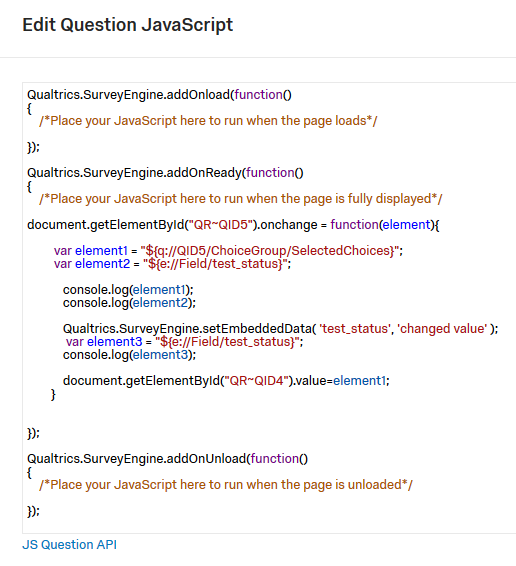 The code runs when the QID5 option is changed.
the console shows element1 = empty (actually not sure if null, empty, or space)
the console shows element2 = require
the console shows element3 = require
I am sure I am doing something silly. I can get and change the information using the document object model, but I would prefer to be more direct (ie using Qualtrics functions) as the DOM could change.
Thanks,
Rett
P.S. Sorry I had to include an image of the code. Whenever I tried to include the code I received an access error. I have a call in to Qualtrics support to see what was going on.
The code runs when the QID5 option is changed.
the console shows element1 = empty (actually not sure if null, empty, or space)
the console shows element2 = require
the console shows element3 = require
I am sure I am doing something silly. I can get and change the information using the document object model, but I would prefer to be more direct (ie using Qualtrics functions) as the DOM could change.
Thanks,
Rett
P.S. Sorry I had to include an image of the code. Whenever I tried to include the code I received an access error. I have a call in to Qualtrics support to see what was going on.


Sign up
Already have an account? Login

Welcome! To join the Qualtrics Experience Community, log in with your existing Qualtrics credentials below.
Confirm your username, share a bit about yourself, then you're ready to explore and connect .
Free trial account? No problem. Log in with your trial credentials to join.
No free trial account? No problem! Register here
Already a member? Hi and welcome back! We're glad you're here 🙂
You will see the Qualtrics login page briefly before being taken to the Experience Community.
Login with Qualtrics
Welcome! To join the Qualtrics Experience Community, log in with your existing Qualtrics credentials below.
Confirm your username, share a bit about yourself, then you're ready to explore and connect .
Free trial account? No problem. Log in with your trial credentials to join. No free trial account? No problem! Register here
Already a member? Hi and welcome back! We're glad you're here 🙂
You will see the Qualtrics login page briefly before being taken to the Experience Community.
Login to the Community
Welcome! To join the Qualtrics Experience Community, log in with your existing Qualtrics credentials below.
Confirm your username, share a bit about yourself, then you're ready to explore and connect .
Free trial account? No problem. Log in with your trial credentials to join.
No free trial account? No problem! Register here
Already a member? Hi and welcome back! We're glad you're here 🙂
You will see the Qualtrics login page briefly before being taken to the Experience Community.
Login with Qualtrics
Welcome! To join the Qualtrics Experience Community, log in with your existing Qualtrics credentials below.
Confirm your username, share a bit about yourself, then you're ready to explore and connect .
Free trial account? No problem. Log in with your trial credentials to join. No free trial account? No problem! Register here
Already a member? Hi and welcome back! We're glad you're here 🙂
You will see the Qualtrics login page briefly before being taken to the Experience Community.
Enter your E-mail address. We'll send you an e-mail with instructions to reset your password.