

How to add Percentages to Incremental Value on a Slider Question | Experience Community
Skip to main content
Solved

How to add Percentages to Incremental Value on a Slider Question

  • Dec 20, 2024 4:14 PM UTC
  • 13 replies
  • 340 views

Forum|alt.badge.img+1

I am trying to add percentage symbols for the values given on the increments for the slider question- is there a java code or some capabilities through qualtrics to allow me to do this? 

Best answer by TomG

Oops, I copied it from somewhere else and forgot to change a variable name.  Corrected:

Qualtrics.SurveyEngine.addOnload(function() {
jQuery("#"+this.questionId+" ul.numbers li").each(function() {
this.innerText = this.innerText + "%";
});
});


View original

13 replies

TomG
Level 8 ●●●●●●●●
Forum|alt.badge.img+27
  • Level 8 ●●●●●●●●
  • Dec 20, 2024 5:17 PM UTC

If you want to add % signs to the scale, you can do this (code for “New Experience” would be different):

Qualtrics.SurveyEngine.addOnload(function() {
jQuery("#"+qobj.questionId+" ul.numbers li").each(function() {
this.innerText = this.innerText + "%";
});
});


Forum|alt.badge.img+1
  • Author
  • Level 2 ●●
  • Dec 20, 2024 7:25 PM UTC
When I add it to the java script, should it look like this? When I input it this way, I still don’t get the % symbols next the incremental values on the scale. 


TomG
Level 8 ●●●●●●●●
Forum|alt.badge.img+27
  • Level 8 ●●●●●●●●
  • Answer
  • Dec 20, 2024 7:54 PM UTC

Oops, I copied it from somewhere else and forgot to change a variable name.  Corrected:

Qualtrics.SurveyEngine.addOnload(function() {
jQuery("#"+this.questionId+" ul.numbers li").each(function() {
this.innerText = this.innerText + "%";
});
});


Forum|alt.badge.img+1
  • Author
  • Level 2 ●●
  • Dec 24, 2024 8:01 PM UTC

Thank you so much, Tom! This worked! 


Forum|alt.badge.img
  • Aug 21, 2025 4:56 PM UTC

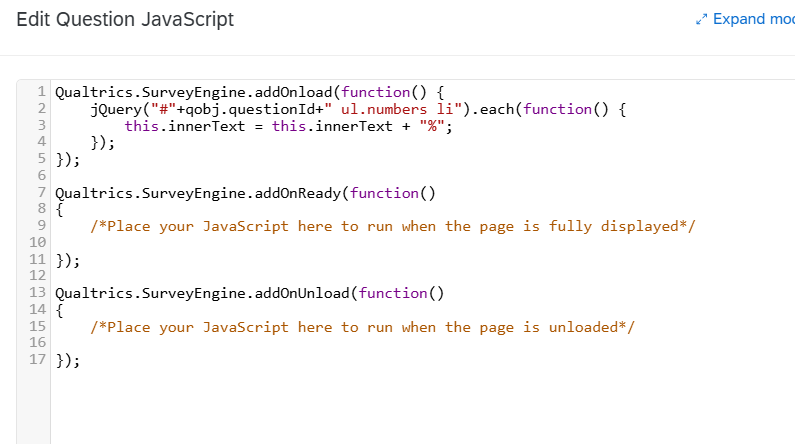
Hi ​@TomG , I just tried this and it isn’t working. My javascript is:


Qualtrics.SurveyEngine.addOnload(function() {
    jQuery("#"+this.questionId+" ul.numbers li").each(function() {
        this.innerText = this.innerText + "%";
    });
});

Qualtrics.SurveyEngine.addOnReady(function()
{
    /*Place your JavaScript here to run when the page is fully displayed*/

});

Qualtrics.SurveyEngine.addOnUnload(function()
{
    /*Place your JavaScript here to run when the page is unloaded*/

});

Do you know what the issue could be? Thanks!


TomG
Level 8 ●●●●●●●●
Forum|alt.badge.img+27
  • Level 8 ●●●●●●●●
  • Aug 21, 2025 5:13 PM UTC

​@ranibawa,

My guess is that your question type is Constant Sum instead of Slider. If it is Constant Sum use:

Qualtrics.SurveyEngine.addOnload(function() {
jQuery("#"+this.questionId+" .TickContainer span").each(function() {
this.innerText = this.innerText + "%";
});
});


Forum|alt.badge.img
  • Aug 21, 2025 5:18 PM UTC

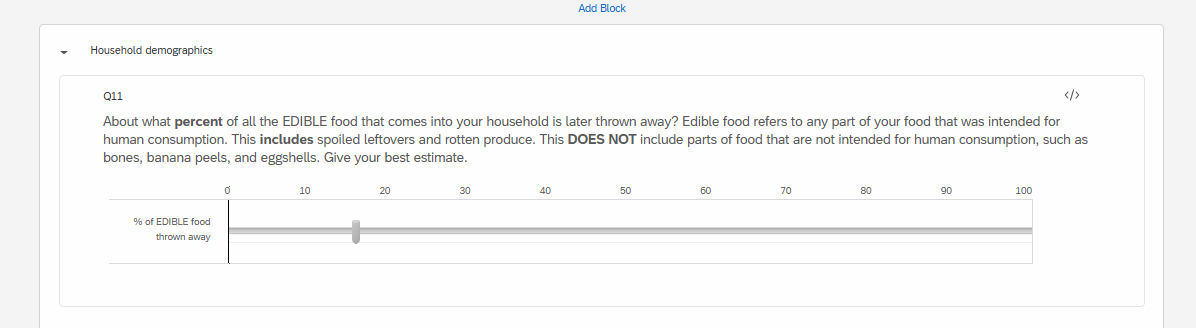
Hi ​@TomG , thanks for your quick response. My question type is Slider, see the attached screenshot. I’m not sure why it wouldn’t work.


TomG
Level 8 ●●●●●●●●
Forum|alt.badge.img+27
  • Level 8 ●●●●●●●●
  • Aug 21, 2025 6:07 PM UTC

​@ranibawa - Can you post a block preview screenshot of it? Better yet if possible, a public block preview link?


Forum|alt.badge.img
  • Aug 21, 2025 6:58 PM UTC

TomG
Level 8 ●●●●●●●●
Forum|alt.badge.img+27
  • Level 8 ●●●●●●●●
  • Aug 22, 2025 1:55 AM UTC

Forum|alt.badge.img
  • Aug 22, 2025 2:19 PM UTC

TomG
Level 8 ●●●●●●●●
Forum|alt.badge.img+27
  • Level 8 ●●●●●●●●
  • Aug 22, 2025 3:52 PM UTC

Aha! It is because Mobile Friendly is turned off.  Use the same JS that I provided for Constant Sum:

Qualtrics.SurveyEngine.addOnload(function() {
jQuery("#"+this.questionId+" .TickContainer span").each(function() {
this.innerText = this.innerText + "%";
});
});


Forum|alt.badge.img
  • Aug 22, 2025 3:53 PM UTC

​@TomG Great, that fixed it! Thank you SO much!